Free AI LinkedIn Headshots with Google AI Studio (2025)
Turn three iPhone selfies into a professional LinkedIn headshot for free using Google AI Studio, no Photoshop or photographer required. Gemini 2.0 Flash wins.
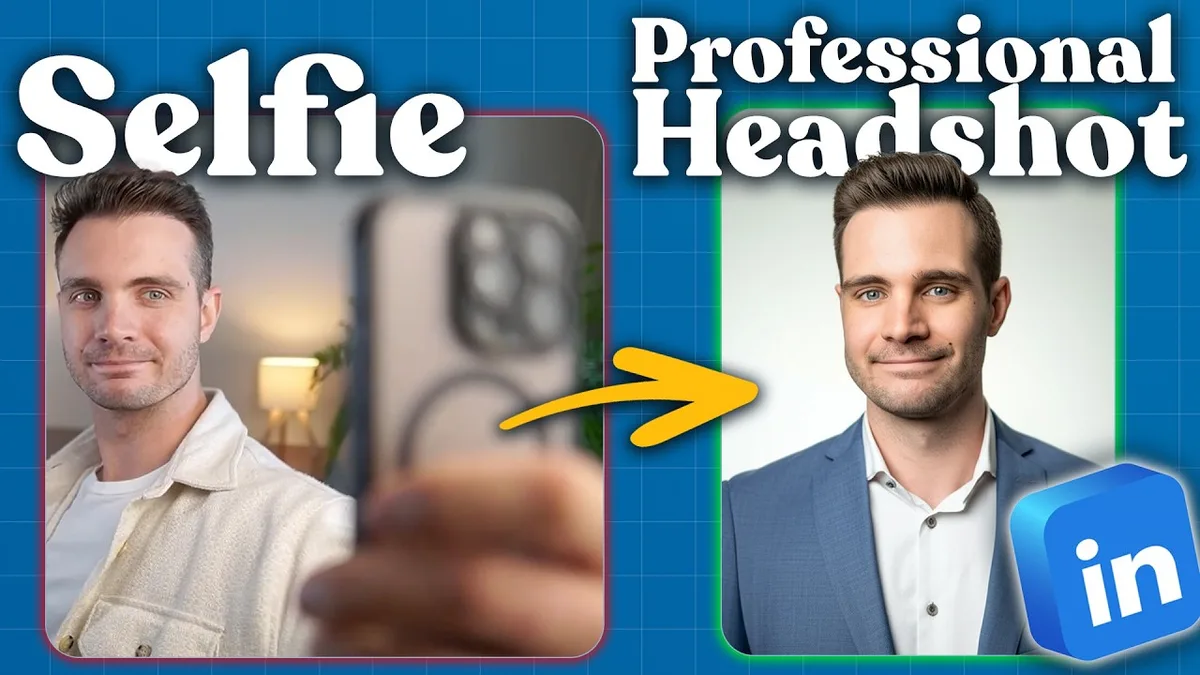
ChatGPT-4o will generate a more flattering headshot than Google AI Studio. It just won't look like you.
That's the thing I didn't expect when I tested both tools side by side. I uploaded the same three selfies to each, ran the same workflow, and ChatGPT-4o returned a polished, professional-looking man, who happened to share roughly my coloring. Google AI Studio returned me: my eyes, my wrinkles, my dimple, my hairline, my beauty mark. One of these is useful for a LinkedIn profile. The other is a better-looking stranger.
Here's the full workflow. You need your phone, a Google account, and about 15 minutes.
Step 1: Get into Google AI Studio#
Go to aistudio.google.com and sign in with any Google account. It's free. No subscription, no waitlist. Once you're in, confirm you're on the Gemini 2.0 Flash image generation experimental model, this is the one that handles facial feature replication well. If you're on a different model, the results won't be as accurate.
If you've never used AI Studio before, my post on Google AI Studio for content creators covers the interface in more depth.
Step 2: Take three reference selfies#
Pull out your phone and take:
- One photo straight on, face forward
- One from your left side
- One from your right side
Natural light works fine. You don't need a ring light or a clean background, the model is reading your facial structure, not the environment. The goal is three angles that give the AI enough data to reconstruct your actual face.
Step 3: Convert to JPEG#
This matters more than it sounds. Before uploading, convert all three images to JPEG. On a Mac, select the files, right-click, choose Export, and select JPEG. On Windows, open each in Photos and save as JPEG.
HEIC files (the default iPhone format) can cause issues. JPEG is the safe format across every tool you'll use.
Step 4: Upload and prompt in two passes#
Drag all three JPEG files into the AI Studio editor. Then start with a simple prompt:
Generate a high resolution professional corporate headshot of this person.
Run it. You'll get a first pass, probably accurate to your face, but with a generic outfit and background. From there, refine with a follow-up prompt that specifies what you actually want:
I should be wearing a business professional outfit so I can use it as a LinkedIn cover photo. The background should be a light gradient of white. The lighting should be professional photo studio lighting.
The two-pass approach works better than front-loading all the detail at once. The first pass locks in your facial features. The second pass dresses the image. When I ran this sequence, the result had my actual eyes, the wrinkle lines I recognize, my dimple, and my hairline, all accurate from three iPhone photos.
When you're happy with the result, hit the download button to grab the full-resolution file.
If you want ready-made prompts for headshots, marketing copy, and other AI content workflows, grab the free Marketing Prompt Collection at moelueker.gumroad.com/l/marketing-prompt-collection.
Why ChatGPT-4o loses this one#
I ran the identical three-selfie workflow through ChatGPT-4o image generation expecting it to win. It's the more hyped tool. The output was genuinely better-looking, sharper, more polished, more "stock photo" energy. But as I said after seeing it: "it gave me an even better looking image, but it does not look like me."
I tried it twice. Both times it produced a similar-looking man who wasn't me. Good bone structure, clean background, professional suit. Completely useless for a LinkedIn profile where the point is that people recognize you.
For headshots specifically, accuracy beats aesthetics. AI Studio's Gemini 2.0 Flash is the better tool for this use case, and it costs nothing.
Watch the full video on YouTube: https://youtu.be/2eSIyQn2mF4
This post contains affiliate links. I only recommend tools I actually use.
Get new videos in your inbox
Weekly AI workflows. No fluff.
No spam. Unsubscribe anytime.