Why Most AI Instagram Post Generators Look Fake (And How to Get Real-Looking Posts)
The reason AI Instagram posts look obviously fake isn't the model. It's that most tools don't understand brand references. Here's the rule that fixes it.
 By Moe Lueker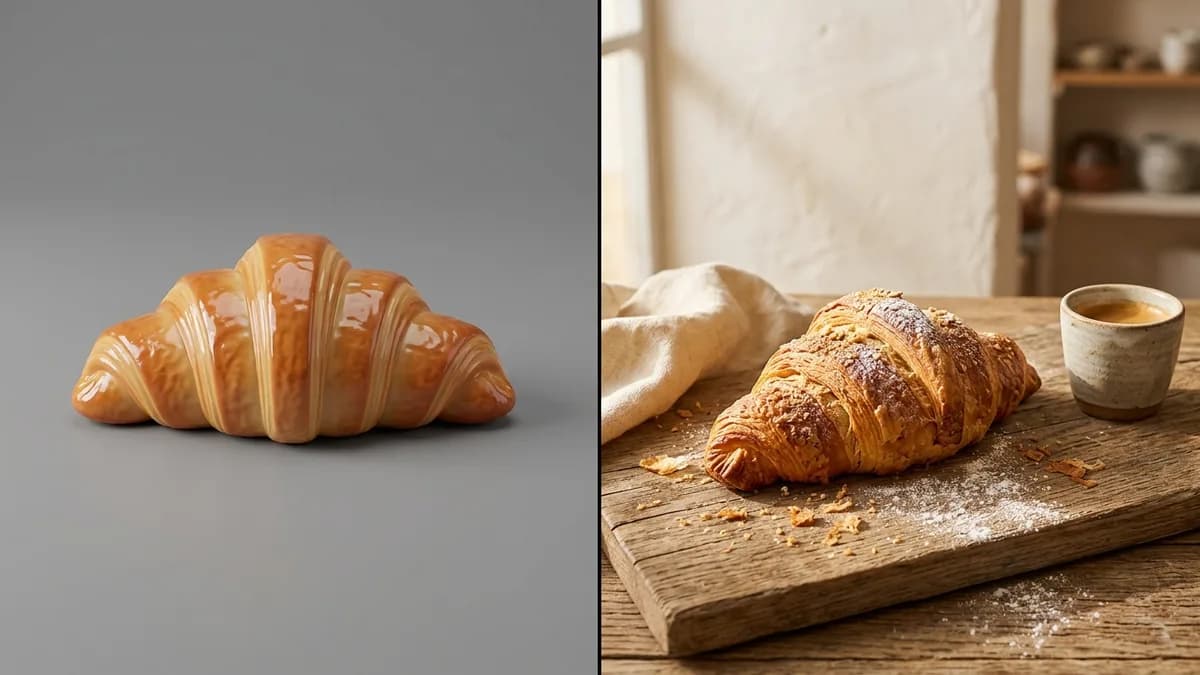
Everyone who has tried AI for Instagram has the same reaction. It looks obviously AI. The products are uncanny, the logos sit in weird places, the scale is off. So everyone concludes the tech just isn't ready yet. They're wrong about the reason.
The "fake tell" that makes AI posts obvious#
Before we get into the fix, here's what your eye is actually picking up when a post looks AI-generated. Once you learn the tells, you cannot unsee them.
- Uncanny product rendering. The croissant has 11 ridges. The bottle label is warped. The coffee foam has a pattern no barista ever pulled.
- Wrong scale. A "coffee cup" the size of a dinner plate. A pastry bigger than the person's hand holding it. Image models do not know how big things are supposed to be unless you show them.
- Stamped logos on edible items. Logos don't appear on food in real photos. When AI puts your logo on a muffin, the post screams synthetic.
- Hero framing on every shot. Every frame looks like a magazine cover. Real Instagram feeds have casual moments, half-eaten plates, slightly off angles. AI defaults to perfect, and perfect is the dead giveaway.
The actual problem is not the image model#
Current image models can handle photorealistic food, drink, and product shots without breaking a sweat. Gemini 3.1, GPT Image, and Flux all produce output that passes for real photography when they're given the right inputs.
The problem is that most AI social media tools don't pass any brand reference images to the model at all. You type a prompt, the tool forwards that text to an image API, and the model generates from scratch. Without references, the model has no way to know what your product actually looks like. It invents a plausible croissant, a plausible bottle, a plausible storefront. Plausible is not yours.
That's why you can run the same prompt five times and get five different products back. The tool is guessing. And when the guess is close but not exact, your eye flags it as fake instantly, the same way it flags a bad deepfake.
For a deeper look at what reference-based image models can actually do when you feed them real product shots, read Nano Banana 2: Thumbnails, Ad Creatives, and Product Shots at Scale.
Why template-based tools fail at brand realism#
Canva AI, Adobe Express, and most "AI social media generators" are really template tools with AI text generation bolted on. The "AI" part is the caption. The image is still a template you picked from a stock library, lightly recolored to match your brand.
So your post looks like every other small business's post that used the same template. You are not getting AI-generated imagery of your actual product. You're getting a generic latte photo with your logo pasted in the corner. The reason your posts feel interchangeable is that they literally are interchangeable.
Why reference-based tools win#
The fix is reference images. When you upload your actual products and the tool passes those as reference inputs to the image model, the model uses your product shape, your brand colors, your lighting. Nano Banana 2 specifically supports multi-reference input, and the output doesn't have to guess, it copies.
This is why reference-based output looks different from template-based output in side-by-side tests. The product on screen is yours. The branding is yours. The lighting matches your actual storefront because the model saw your actual storefront. That's the whole trick.
The rule of thumb#
If the tool doesn't let you upload your actual products as reference images, it cannot make an on-brand post. That's the whole test. Canva AI? No. Adobe Express? No. ChatGPT Image? Sort of, you can paste references manually but the flow is clunky. Sevenposts? Yes, the tool is built around it.
Every other feature is noise. Caption generation, hashtag suggestions, scheduling, filters. All of that is solved. The only thing that separates a post that looks like yours from a post that looks like stock is whether the image model saw your product first.
Frequently asked questions#
Why do AI-generated Instagram posts look fake?
They look fake because most AI tools generate images from text alone, without any reference to your actual product. The model invents a plausible version based on your description, which is close enough to feel uncanny but never exact. The tells are wrong product scale, warped labels, logos stamped on food, and magazine-cover framing that never matches a real feed.
What's the best AI Instagram post generator in 2026?
The best AI Instagram post generators in 2026 are the ones that accept reference images. Template tools like Canva AI and Adobe Express only generate captions, not actual brand imagery. Tools built on reference-based image models produce output that matches your real product because they see it before they generate. That's the differentiator worth paying for. I ranked all seven tools I tested in my comparison of the best AI social media post generators in 2026.
Can AI make Instagram posts that look real?
Yes, but only with reference-based tools. A generic AI image generator will always produce posts that feel off because it has no idea what your product, storefront, or brand colors actually look like. A reference-based tool feeds your uploaded product photos into the image model as inputs, which means the output uses your actual assets as the starting point instead of guessing.
If your current tool doesn't ask you to upload your products, it's not making you branded content. It's making you templates with better captions.
Moe shares tool walkthroughs and lessons from real projects. Mechanical engineer, then venture capital, now building AI tools for creators and small businesses. More about Moe