MiniMax M3 in Claude Code: What $20 a Month Actually Gets You
I built the same website twice, generated its cover images and a voiceover, and it used 13% of my weekly limit. The real usage numbers from running MiniMax M3 inside Claude Code, including where it lost to Claude.
 By Moe Lueker
Two full websites. Every cover image on them. A voiceover reading one of the articles out loud.
That run used 13% of my weekly limit on a $20 a month plan.
That number is the whole reason I made this video, because it reframes the argument. The interesting thing about MiniMax M3 is not that it scores well. It doesn't, particularly. It is that "am I going to run out this week" stops being a thought you have.
What I actually ran#
I pointed Claude Code at MiniMax's endpoint in a brand new empty folder and gave it one job: build a small online magazine.
Then I did it a second time in a separate folder with the identical brief, changing exactly one thing. Same session, same plan, same key, running in parallel.
While those built, I asked it to generate a cover image and a voiceover from the same subscription, to see whether the shared quota claim held up.
Then I opened the usage page.
The numbers#
Everything here came off my own screen, not a spec sheet.
Intelligence: Artificial Analysis puts M3's index at 45. Claude Opus 5 is well above it. M3 is not the smartest model available and I am not going to pretend otherwise.
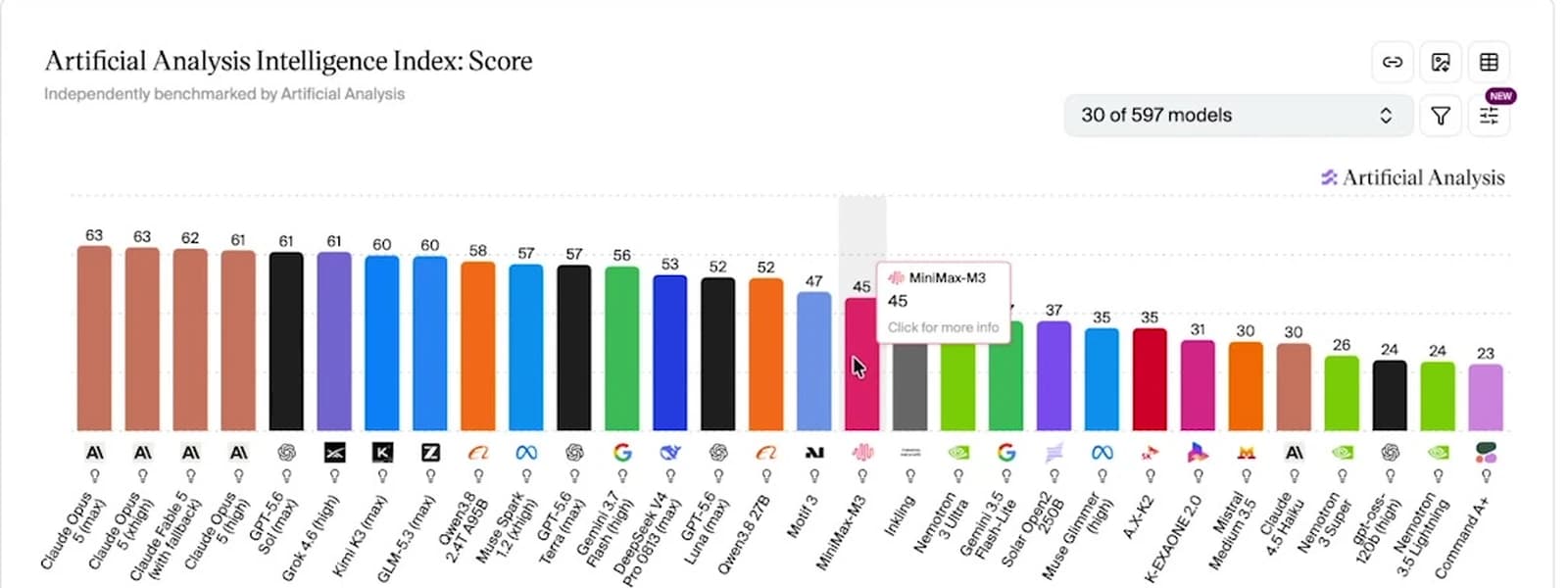
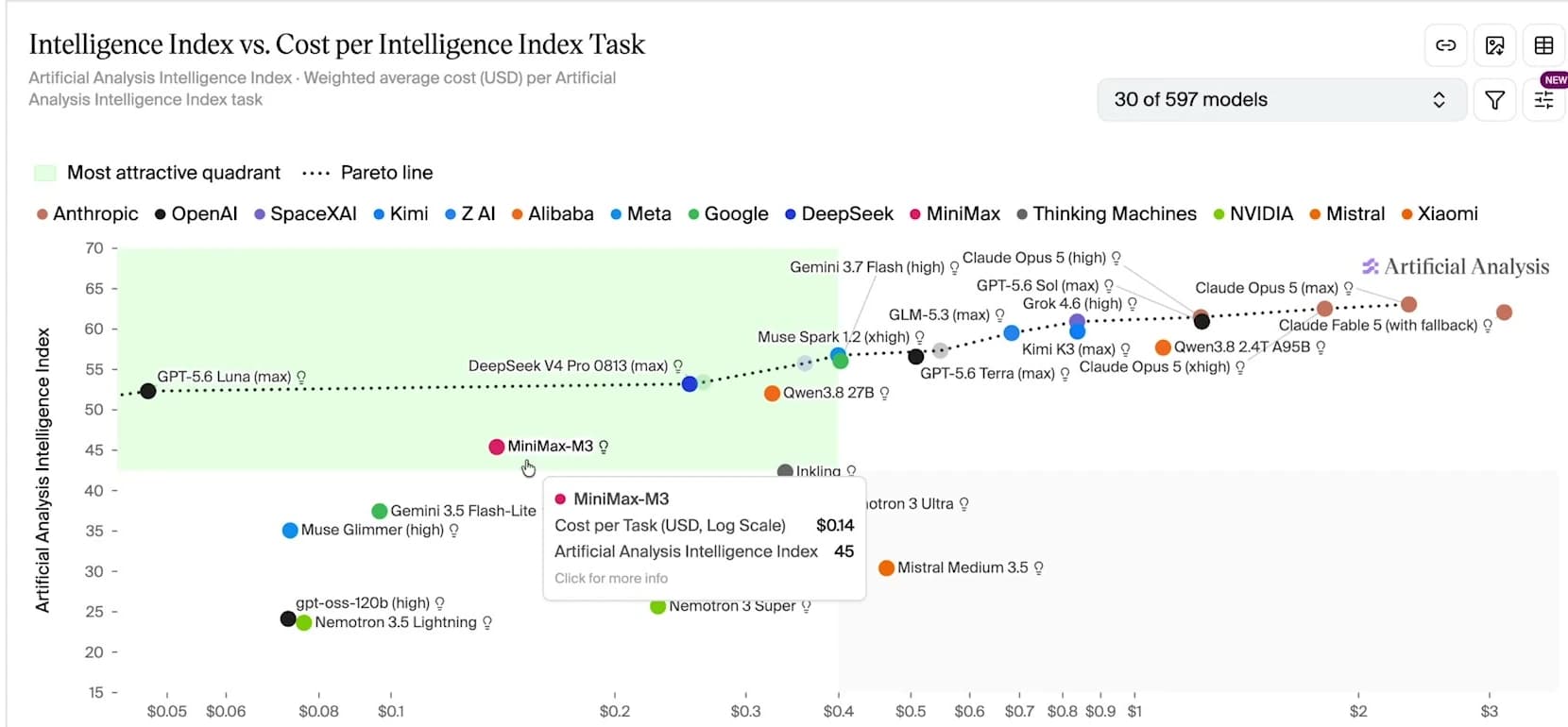
Cost per task: roughly 14 cents. To be fair to the rest of the field, GPT-5.6 Sol is cheaper on that same chart and scores higher. If cost per task were the only axis, M3 would not win it.
This is the chart that actually made the decision for me. Intelligence up the side, cost per task along the bottom, log scale. M3 sits at $0.14 inside the green "most attractive quadrant" while Claude Opus 5 sits at 63 and somewhere north of $2 per task. You are paying roughly an order of magnitude more for about a third more index.
Usage after the full run: 68% of a 5-hour limit, and 13% of the weekly limit. That is after two complete websites with light and dark modes, hero images on every article, generated cover art and a working audio player.
Sustained use: separately, I coded nonstop for five hours and never hit the cap.
The comparison that matters to me: on the $20 Anthropic plan I would not have finished one of those sites. I would have hit the five-hour limit somewhere around the homepage.
What MiniMax's own benchmarks claim#
Worth looking at separately, because vendor numbers and independent numbers rarely agree and you should see both.
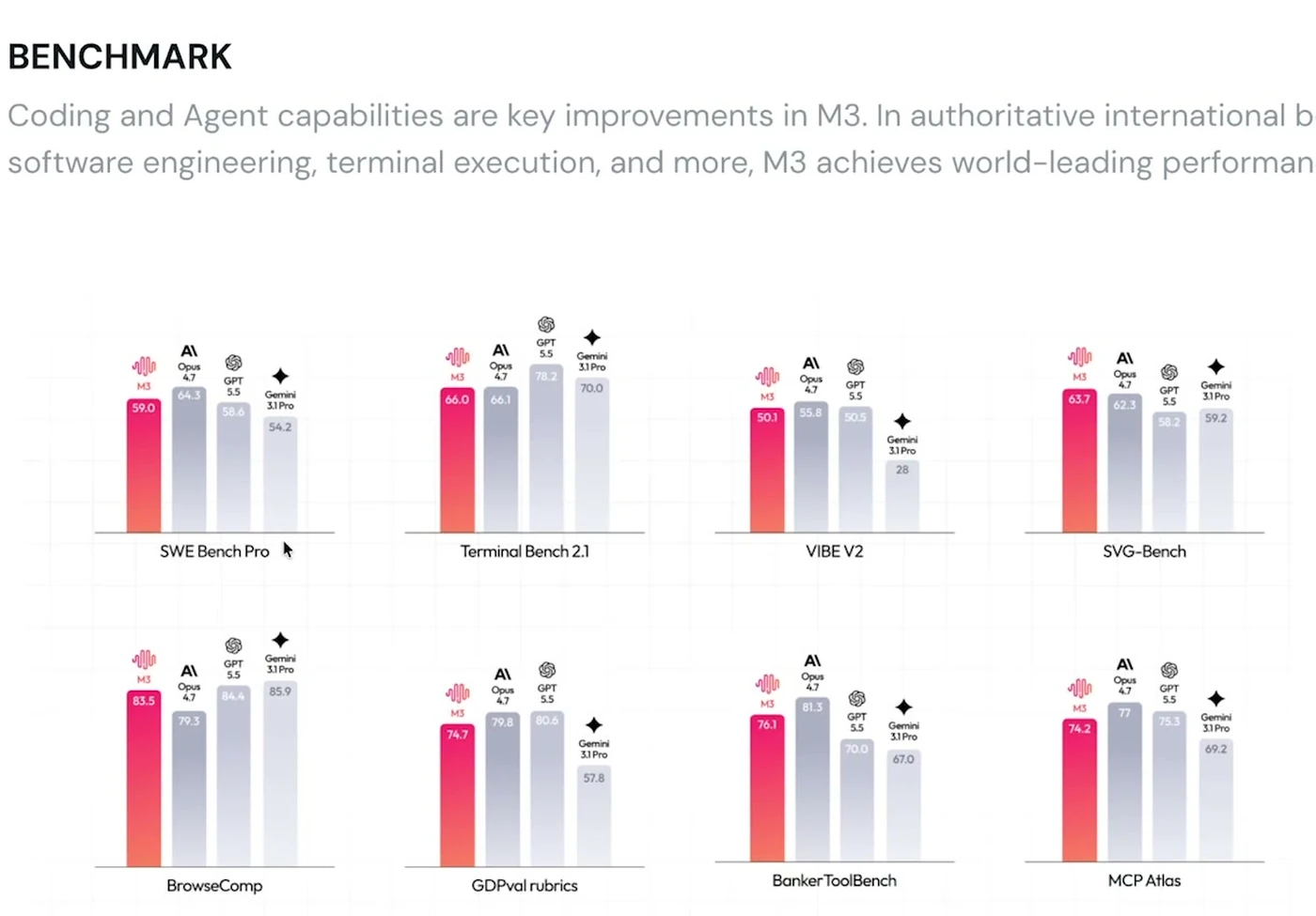
On MiniMax's page M3 posts SWE Bench Pro 59.0, Terminal Bench 2.1 66.0, BrowseComp 83.5, MCP Atlas 74.2 and BankerToolBench 76.1, each shown next to Claude Opus 4.7, GPT 5.5 and Gemini 3.1 Pro.
Read it honestly and it is more mixed than the framing suggests. BrowseComp is a genuine win, 83.5 against Opus 4.7's 79.3. On SWE Bench Pro it is second, 59.0 to Opus 4.7's 64.3. On Terminal Bench 2.1 it is fourth. On KernelBench Hard everything is low and M3 is lowest of the four.
That is roughly the shape I would expect from an open-weight model at this price, and it lines up with what I saw in practice: strong on browsing and tool use, competitive on straightforward engineering, behind on the genuinely hard stuff. Which is exactly what the independent index says too, just with better lighting.
The bit that isn't on the chart#
M3 has a 1 million token context window, and it ships image generation and text-to-speech on the same subscription and the same API key.
That second part is the genuinely unusual bit. No coding plan I pay for bundles code, images and speech into one quota. Your Claude plan doesn't. Your ChatGPT plan doesn't.
In practice that meant asking Claude Code for a cover image and getting sunset.jpg written into the project folder, from the image-01 model, on the same key I was coding with. Then asking for a voiceover and getting an MP3 back from speech-2.8-hd that was good enough to sit on a live article page.
That is not a benchmark. It is one subscription doing three jobs, and it changes what you bother building. Generating a voiceover for every blog post stops being a separate tool, a separate bill and a separate integration.
The context window is the other thing you feel daily rather than read about. On a big build I watched the counter climb past a few hundred thousand tokens without stopping to compact. Compaction mid-task is the single most annoying thing about long agent runs, and not having it happen is worth more than a couple of points of index score.
The design lesson had nothing to do with the model#
Build one, with no design direction, came out fine. Clean, functional, light and dark mode, correctly linked. It also looked like every other AI-generated site on the internet.
Here is the part worth internalizing: that is not a MiniMax problem. I ran the same vague prompt on Claude and got the same flavor of generic. Undirected design is a prompting problem, not a model problem.
Build two used the identical brief with one change. Instead of "make it look good," I pointed it at my own component library and told it to read the whole thing before writing a line of code. Same content, completely different result. Real depth, a shimmer on the card edges, restraint.
I was not uncritical of it. The italic serif was wrong, and there's a decorative line down the side that reads as an AI giveaway to me. Both are trivially fixable. But the gap between build one and build two was much larger than the gap between any two models I have tested on the same prompt.
The library is free and open source and works with any coding agent, so you can run this exact before-and-after with whatever model you already pay for. It's Open Glass UI, with a live demo and the docs here.
Where it lost#
I want to be specific rather than diplomatic.
M3 is not on par with Claude Opus 5, Fable 5 or GPT-5.6 Sol on the hardest work. For genuinely ambiguous reasoning, or when a front end has to be beautiful on the first pass, I still reach for Claude and I expect to keep doing that.
It is also a jumpier agent. At one point it got stubborn about calling MiniMax's own image and speech models, because it decided my API key looked suspicious, and I had to point it at the documentation before it would proceed. Claude does not do that.
And the voice model put an odd pause in one of the takes.
None of those are dealbreakers for what I use it for. All of them would be if I pretended they weren't there.
Who it's actually for#
If you are picking one model for everything and money is not the constraint, this is not your model.
If you run coding agents that chew through usage doing work that just needs to be smart enough, it is a very easy call. That is most of my day. Boilerplate, wiring, refactors across many files, reading a codebase and reporting back. Frontier quality is great and it is not always necessary, and paying hundreds a month in API costs is not something I want to do.
It has become my go-to for exactly that tier of work, and Claude stays for the top of it.
For where the newest frontier models sit on the same cost curve, see Claude Opus 5.5 vs GPT-6 Sol and Luna.
The setup, briefly#
The whole thing is one small .claude/settings.local.json file in a single project folder, and only two lines really matter: one points Claude Code at MiniMax instead of Anthropic, the other is your key.
Because it is scoped to that folder, your normal Claude setup keeps working everywhere else on your machine. Open a terminal in another project and nothing has changed. That is what makes it worth trying rather than committing to.
I wrote the general version of this up separately, since the same two lines work for local models, routers and other providers: how to change the model in Claude Code.
For this specific setup, the free guide with every command and both build prompts is here, and if you want the plan, my link has 12% off.
I've also used MiniMax's agent for a completely different job if you want to see it outside a coding context, and if the cost angle is what brought you here, the $8 a month Hermes Agent setup is the same idea applied to a different tool.
Two websites, images, voice, 13% of a week. That is the argument.
This post covers a video sponsored by MiniMax. They paid for the coverage, not the verdict, and the numbers above are off my own usage page.
Moe shares tool walkthroughs and lessons from real projects. Mechanical engineer, then venture capital, now building AI tools for creators and small businesses. More about Moe
Get new videos in your inbox
Weekly AI workflows. No fluff.
No spam. Unsubscribe anytime.