AI Proposal Generator: I Sent a Real Proposal From ChatGPT
I connected PandaDoc to ChatGPT and Claude, then wrote, sent and tracked a real business proposal without leaving the chat. Full setup and honest limits.
 By Moe Lueker
The worst part of sending a proposal is the silence after it.
You get off a good call, spend an hour building the document, send it, and then you are refreshing your inbox trying to work out whether anyone opened it. By the time you follow up, the deal has usually gone somewhere else.
So I wired PandaDoc into ChatGPT and Claude, described a deal in one sentence, and got back a finished, branded, signable proposal. Then I sent it, watched it get opened, and watched it get signed, all from the chat window. Here is the whole setup, and the parts that are still rough.
What actually makes a business proposal get signed#
The fastest workflow in the world cannot save a proposal that was weak to begin with, so start here.
Most qualified B2B deals do not lose to a competitor. Matthew Dixon and Ted McKenna analysed 2.5 million recorded sales conversations for The JOLT Effect and found that between 40 and 60 percent of them end in no decision at all, and 56 percent of those trace back to the buyer being afraid of making the wrong call. Your competition is usually the client doing nothing.
That gives a proposal exactly one job: remove doubt. Not look impressive. Remove doubt.
Six parts do that reliably:
- Their goal, in their own words, before anything about you
- What is included, and what is not
- Proof you can actually deliver it
- Upfront pricing with a few options and one clear recommendation
- A timeline
- One obvious next step
Speed is the other half. Storydoc looked at 1.3 million proposal sessions and found 46 percent of signatures happen within 48 hours of the client first opening the document. Momentum decays fast, so the proposal you send the same afternoon beats the beautiful one you send on Thursday.
Connecting PandaDoc to ChatGPT#
PandaDoc has been the proposal tool for years. What is new is that it now plugs straight into both ChatGPT and Claude, and the setup takes about a minute each. PandaDoc sponsored this video and gave me an account to build the whole thing on, which is how I could send, open and sign real documents on camera instead of miming it on a mockup.
In ChatGPT, open a project, go to plugins, search for PandaDoc, hit the plus, allow the permissions, and connect. That is the entire setup. No API key, no code, nothing to install.
To check it worked, I asked it one question: what proposal templates do I have in PandaDoc. It came back with both of mine, which means the connection is live and the AI can see my actual account.
Connecting PandaDoc to Claude#
Same account, same one minute. In Claude, go to Settings, then Extensions, browse extensions, search PandaDoc, connect, and allow access. I asked the identical question about my templates and got the identical answer.
If you already live in one of these two chats, use that one. There is no reason to run both unless you want to, and I only did it to show that the workflow is the same either way.
Build one template first#
This is the step people skip, and it is the one that decides whether the output looks like a real company sent it.
PandaDoc's template library is genuinely deep, so start from one of theirs rather than a blank page. Mine is based on their AI proposal template. Inside the editor you drop in your logo, and you leave the yellow variable fields alone because those are what the AI fills later. Then set your signature fields, assign the roles, and pick the signing order. I sign last on mine. You can drag yourself to the top if you would rather countersign first.
Do that once. Every future proposal inherits it.
One prompt, one finished proposal#
Here is the actual prompt shape: I am making a proposal for this client, use my AI proposal template, here is what they do and what they need, here are the phases and prices, here is the timeline and the payment terms, here is who signs it, and show me the draft before you send anything.
For the demo that was a professional services firm losing hours a week to manual client reporting, with three phases at $4,000, $6,000 and $2,000.
One message. The document came back filled in: their company, my company, who it is prepared for, the cover letter, the project summary, the deliverables, the schedule, and the signature pages in the right place.
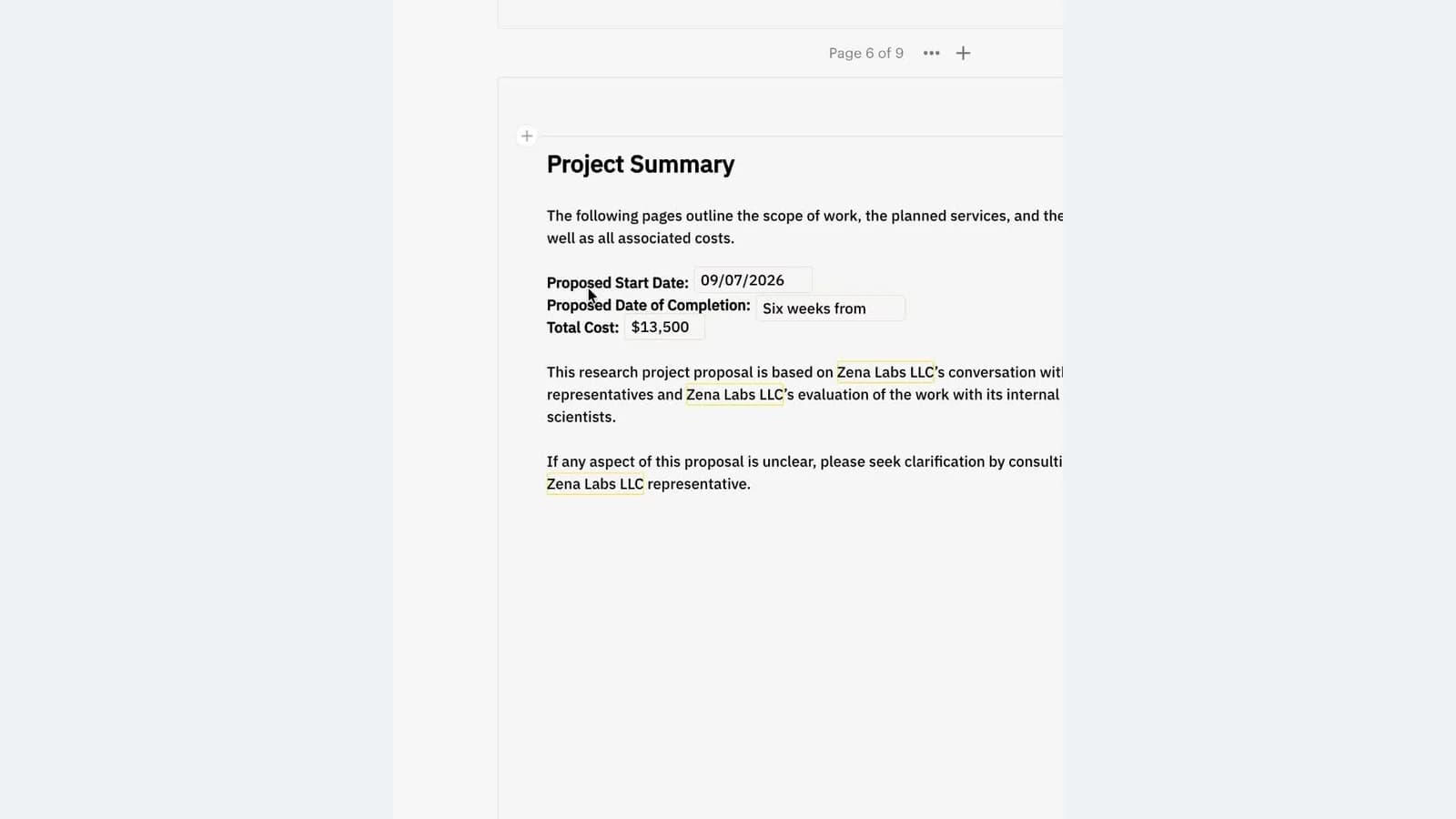
Then the part that actually surprised me. I asked it to change the build and implementation phase to $7,500 and show me the new total. It updated the real document, and the total moved from $12,000 to $13,500 on the page. Same for dates. You edit a live contract by asking, not by clicking into a builder.
When it looked right, I typed please send this for me. It found the recipient and sent it.
Watching it land#
This is the half nobody shows, and it is the reason I wanted to make the video.
Once the proposal is out, the document's activity view logs what happened and when: email delivered, email opened, document viewed, document completed, each with a date and timestamp. For the demo I sent it to my own second inbox so both sides are visible on screen, signed it as the client, and watched the status flip.
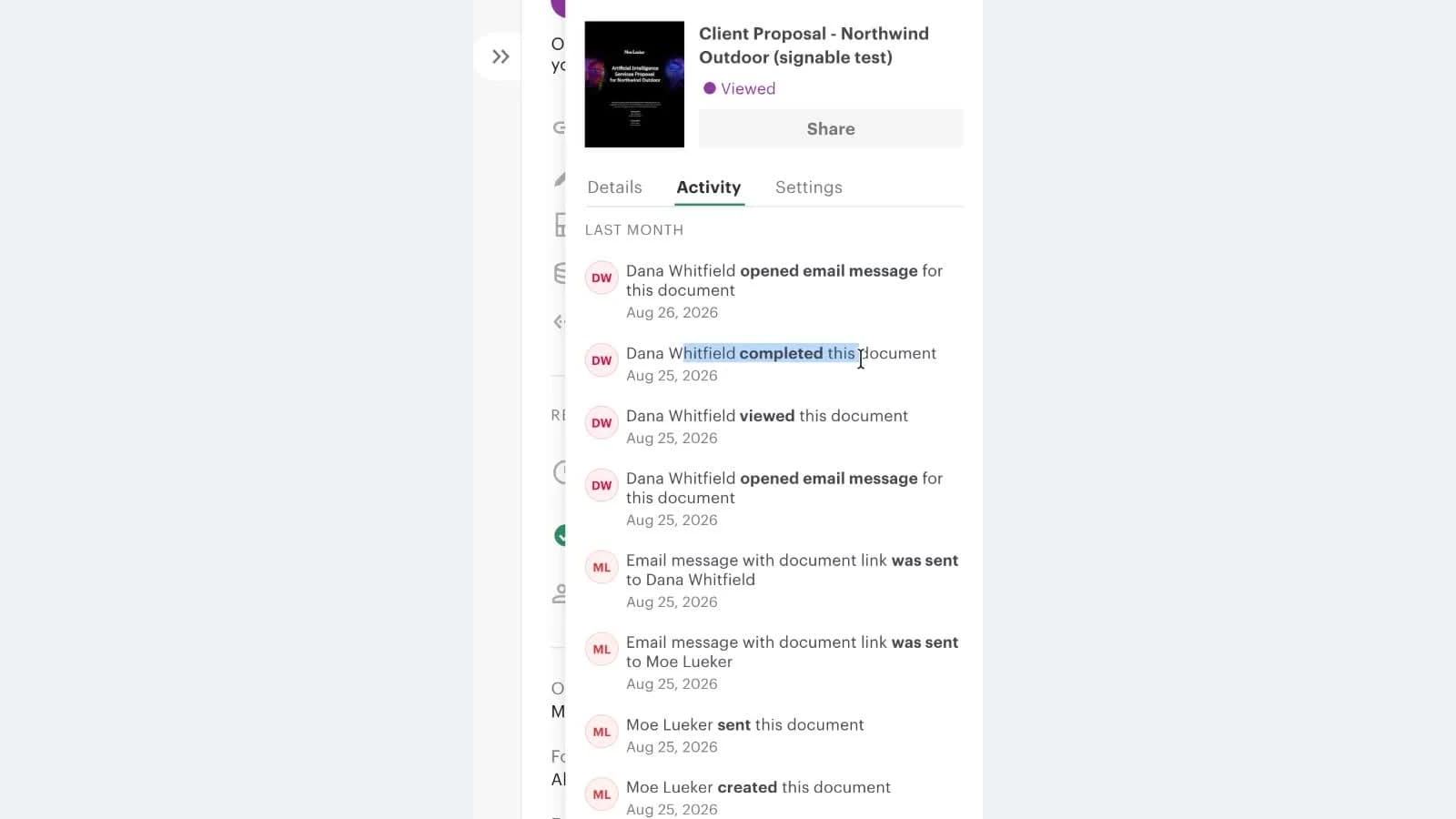
You stop guessing. If something sits unsigned, you can see whether it was ever opened, then nudge, reshare, or escalate to someone else at the company. That is a different follow-up conversation than "just checking in."
Building from scratch in Claude#
For a one-off I skipped the template entirely. I had Claude write a licensing proposal for 50 lifetime seats of Rambleproof, my own Mac dictation app, then upload it into PandaDoc and send it.
It worked, and editing it by asking worked too. I told it to reframe a latency figure as a measured baseline rather than a hard promise, and the paragraph changed in the document.
Two honest limits. A from-scratch document comes out with rougher formatting than a template, so for anything that goes to a real client I would still use the template route. And on my free account the detailed pricing-table section was not available, so the fancier pricing block needs a paid plan.
Who this is actually for#
If you send one proposal a quarter, you do not need this. If you send ten or twenty documents a month, or you are stitching together a Word file, a PDF export, an email, and a separate signature tool, the connector removes most of that.
It also connects outward. Stripe for collecting payment on the document, and HubSpot, Pipedrive or Salesforce so deals stay in sync. I keep my own client tracking in a tool I built in an afternoon, which I walk through in how I built a CRM with AI in 15 minutes.
The pattern here is the same one I keep coming back to: the AI chat stops being a place you copy things out of and becomes the place the work happens. I did this with my inbox first in giving Claude full access to my Gmail, and the broader operating model is in building AI business systems.
Every prompt I used, plus the six part structure written out, is in the free playbook below.
The thing I would not give back is the tracking. Writing the proposal faster is nice. Knowing it was opened twice and signed at 9:14 the next morning is what changes how you follow up.
PandaDoc sponsored the video this post is based on, and Rambleproof is my own app. The PandaDoc links are campaign tracking links rather than affiliate links, so I earn no commission if you sign up.
Watch the full walkthrough on YouTube: https://youtu.be/Iu8wqQUKPTM
Moe shares tool walkthroughs and lessons from real projects. Mechanical engineer, then venture capital, now building AI tools for creators and small businesses. More about Moe
Get new videos in your inbox
Weekly AI workflows. No fluff.
No spam. Unsubscribe anytime.