Viktor AI Review: I Made an AI Employee Our Project Manager
Viktor AI review: I gave it messy meeting notes in Slack, and it built the action plan, drafted the follow-ups and ran a live project tracker for my team.
 By Moe Lueker
I handed Viktor the messy notes from a product meeting and wanted to see how much of the follow-up work it would do on its own. It turned them into an action plan, drafted the follow-up emails, built a live project tracker and then kept that tracker updated from plain Slack messages.
I was skeptical going in. I already use Claude and ChatGPT every day, and "AI employee" sounds like a marketing line. After a few weeks of working with it, I get why teams keep adding it.
What Viktor is#
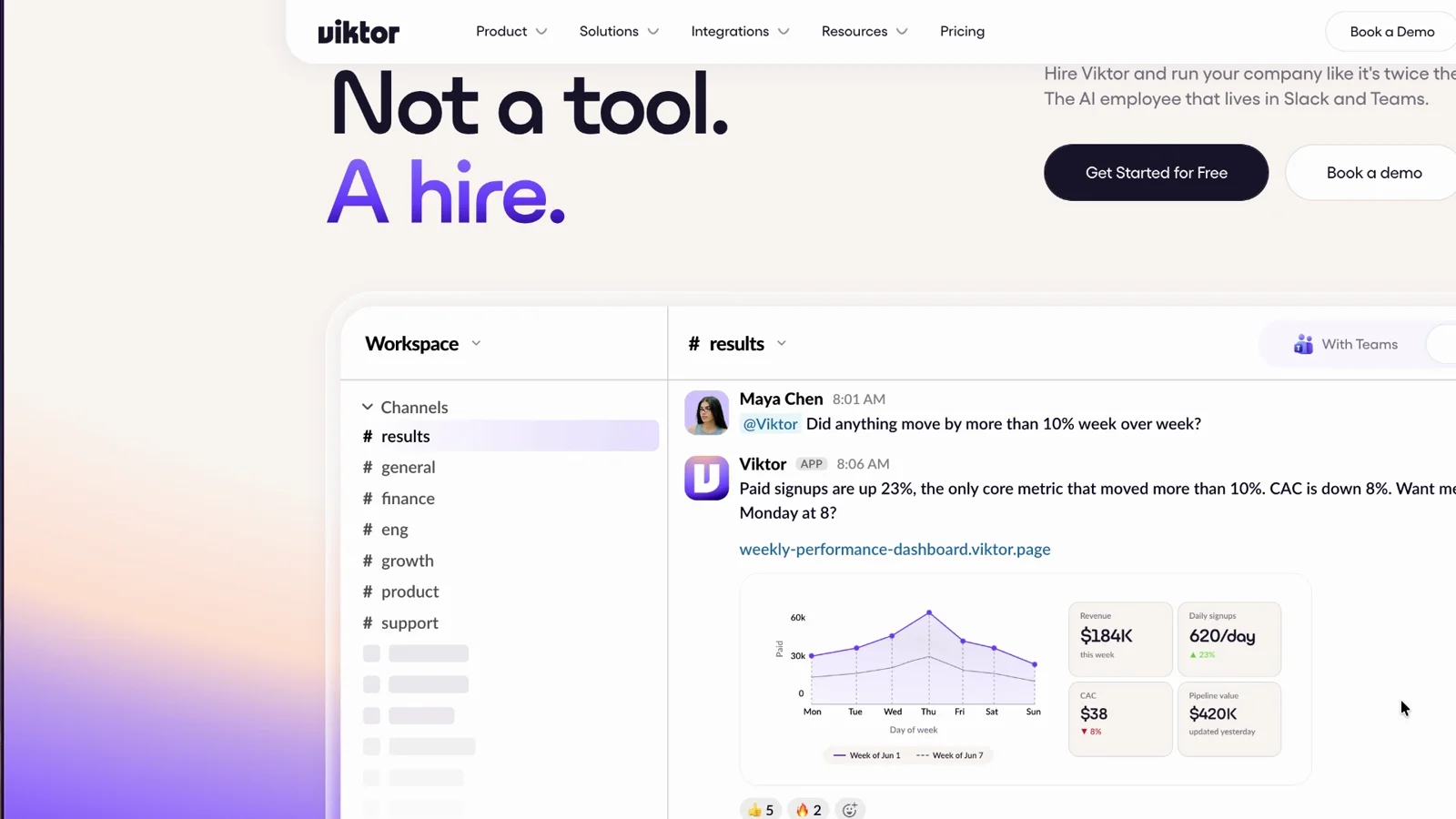
Viktor is an AI employee that lives in Slack or Microsoft Teams. You don't open a new app to use it. You tag it in a channel or send it a direct message, and it works with the tools you connect: email, Google Drive, Notion, Linear, PostHog and over 3,000 others. It can create files, write drafts and build small web pages like the tracker below.
Viktor sponsored the video, and I'm grateful they let me test it on a real project instead of a canned demo. Everything here is what happened on my own workspace.
Setup takes a few minutes#
You sign up, pick Slack or Teams and approve the workspace permissions. Then you choose which channels Viktor joins. I added it to my Rambleproof channel, onboarding and my content channels.
Next you connect tools. I connected Notion first, because that's where most of our work lives. You can add more later from the integrations page.
The first prompt I'd give anyone is "What can you help me with?" Because Viktor could already read our Notion, it knew my business before I explained anything. It knew I run a YouTube channel and offered to send me daily briefs. It felt like onboarding a new hire who already read the whole wiki.
The second prompt: "What tools do you have available?" It lists what you connected and suggests what to add next.
In the workspace settings you can switch the model. I keep it on Smart, which ran Claude Opus 5.5 on medium when I tested it. A cheaper option uses fewer credits for simple jobs.
Test 1: messy meeting notes into an action plan#
The real job was a sync about Rambleproof, the dictation app I built. The notes were long and messy. I tagged Viktor in a channel, pasted the link to the notes and dictated this:
Here are my notes from the Rambleproof sync, and they're all in Notion. Can you turn them into an action plan and keep what we actually decided separate from the ideas? And if something has no owner or date, just say so.
That last sentence matters. Most AI summaries invent an owner or quietly drop the open questions. Viktor split the plan into tasks with owners and due dates, open decisions, and parked ideas, and flagged the items nobody owned. It also offered the plan as a Word document for Google Drive.
Test 2: "Which of these can you help me with?"#
This is where it stopped feeling like a chatbot. I asked which items it could take off my plate.
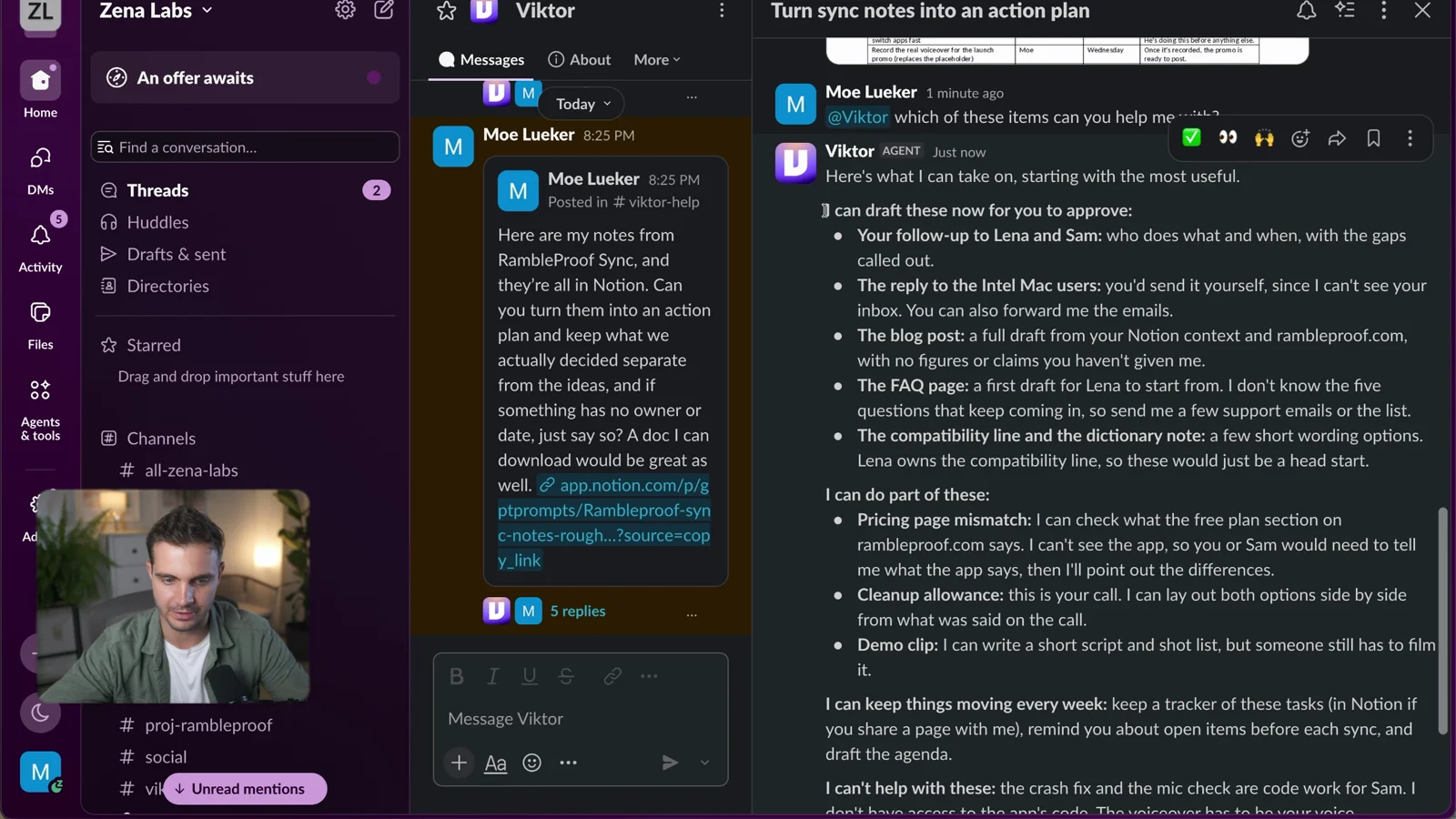
It came back with a list: the follow-up to Lena and Sam, a reply to Intel Mac users, a blog post, the FAQ page and a fix for a pricing page mismatch. I asked for the two emails as drafts in the thread so I could review them first. They were good. With email connected, I told it to send them.
You can tag Viktor into any thread where work is already happening. I keep seeing more people do exactly that.
Test 3: a live project tracker in Viktor Spaces#
Then the real test. I asked Viktor to build a simple tracker in Spaces with the task, owner, status and next steps, to show me who could see it before publishing, to check in daily at 8 a.m., and to act as project manager for the project.
A few minutes later it had built the tracker. It was private to me until I told it to put it in production, then it published it to our own Viktor Space.
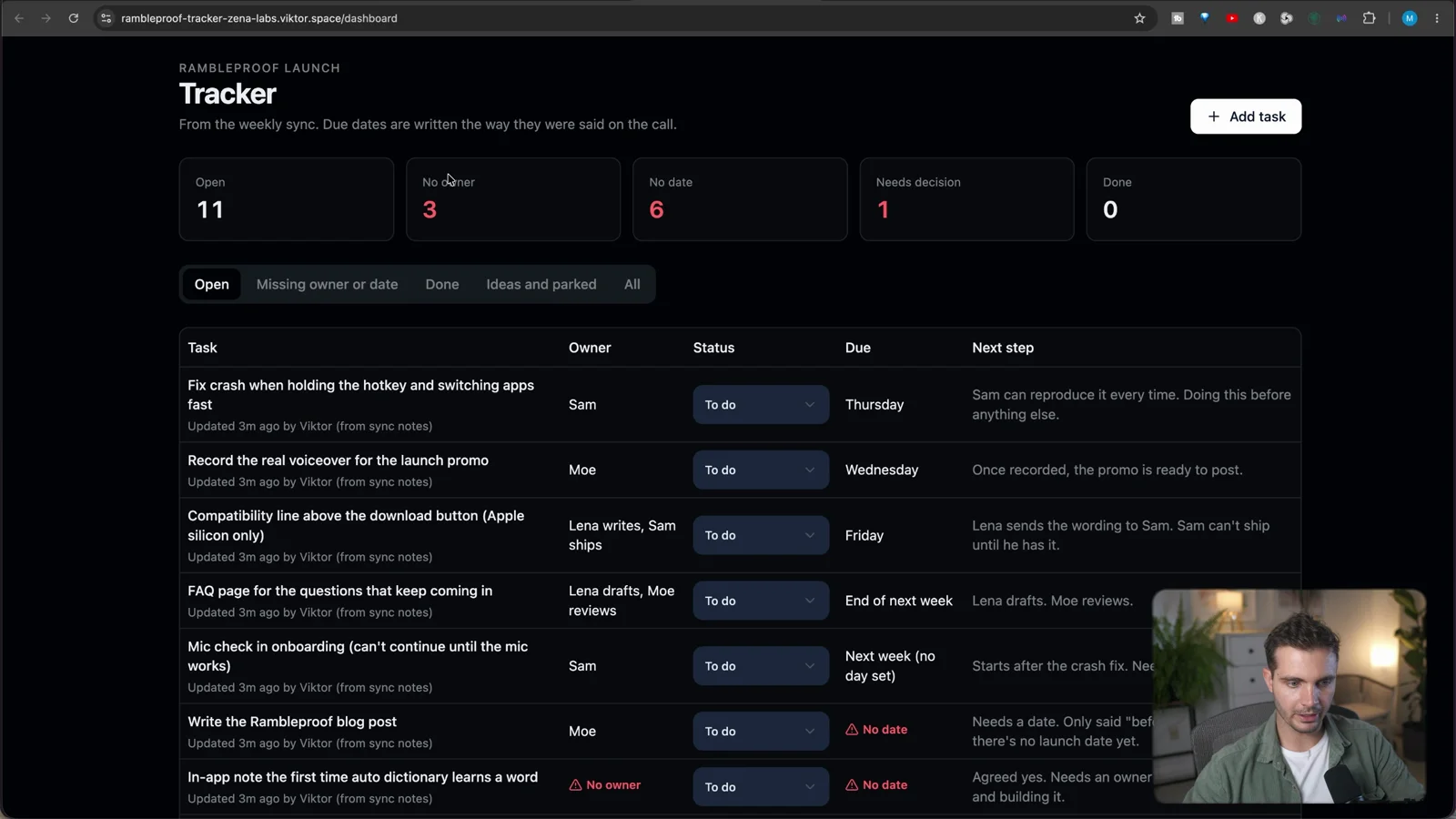
The tracker counts open items, items without an owner and items without a date. When I assigned myself a task and set a due date, both counters dropped by one. You can filter by missing owner, done, decision or parked, and add tasks by hand.
The daily check-in is the part I actually needed. Viktor asks everyone with an open item for a status. I juggle a lot of projects, and things slip. A reminder plus a board I can glance at fixes that.
Test 4: one Slack message updates the tracker#
In the Rambleproof channel I wrote: "Quick update: Sam fixed the hotkey crash, and Lena is taking the dictionary note. Can you update the tracker, please?" I didn't link the tracker. Viktor found it and updated it.
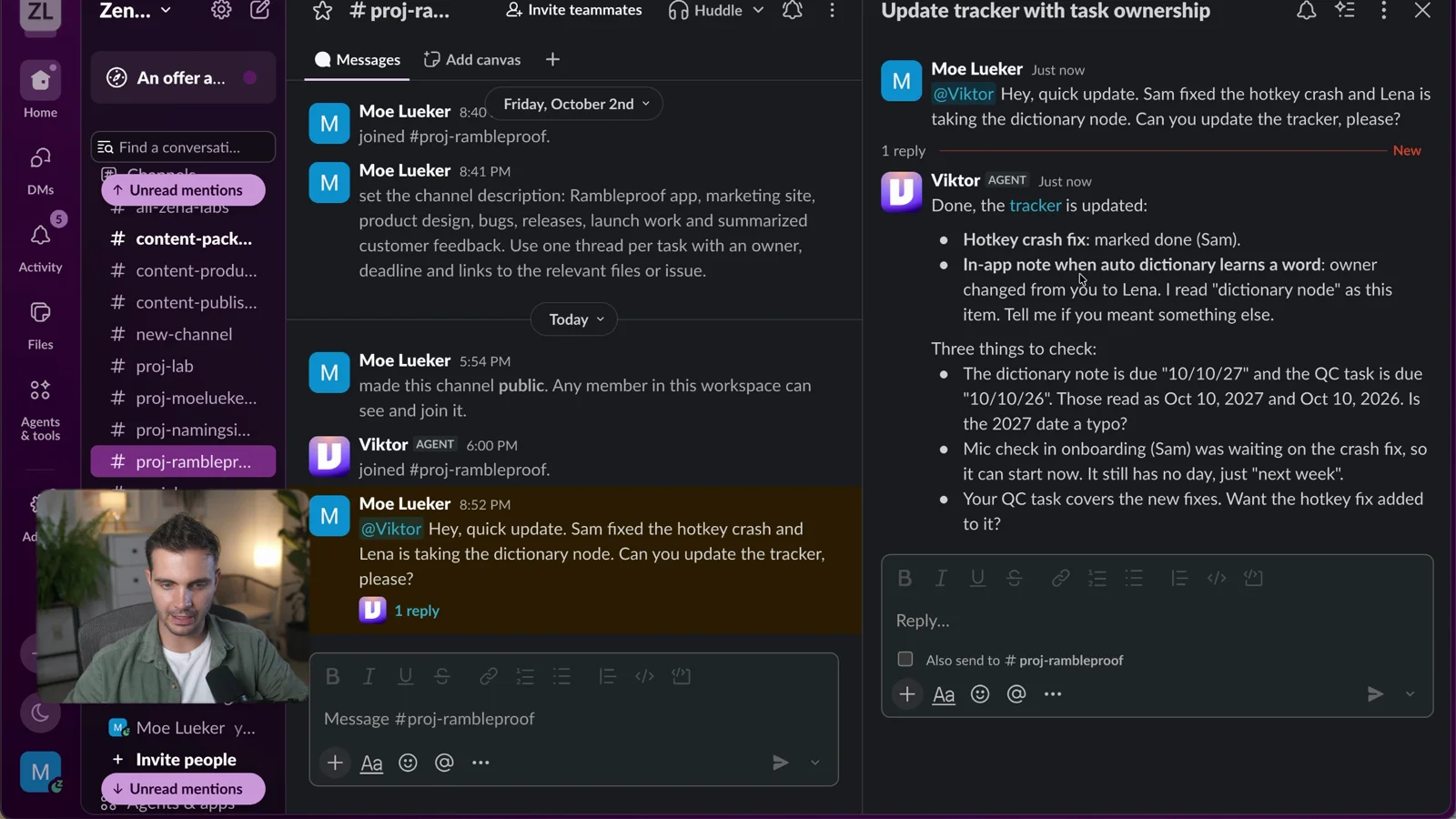
Then a bigger one: the voiceover is recorded, Sam takes the pricing page mismatch, and we keep the cleanup allowance as is. Update the tracker and announce it in our help channel. (The first time I forgot to tag Viktor, so nothing happened. Tag it.) About a minute later, the voiceover task was marked done, Sam owned the pricing fix, the cleanup decision was logged with its date, and the team update was posted in the channel.
Where Viktor fits next to Claude and ChatGPT#
I still use Claude and ChatGPT every day. Viktor doesn't replace them. The difference is where the work lives.
In a chat app, the work ends when the chat ends. With Viktor, the notes, the plan and the tracker live in the systems the team already uses, and anyone on the team can hand it the next job. If you want Claude itself working inside your tools, I showed how in Zapier MCP: let Claude edit your Google Drive. Viktor is the version that sits with the whole team instead of with one person.
If you'd rather build your own team of agents and host it yourself, my no-code Hermes Workspace setup is the cheaper, more hands-on route. And if the meeting notes are the bottleneck before any of this starts, I tested an AI note taker you wear on your wrist.
Pricing#
When I checked Viktor's pricing page on October 14, 2026, new accounts got $100 in free credits with no credit card, and the Team plan was $100 a month for 40,000 shared credits, with unused credits rolling over. That's the plan I'm on. My link plus code MOELUEKER100 takes $100 off your first invoice.
What I learned#
Viktor works best when you give it clear source material and a specific outcome. "Turn these notes into a plan, keep decisions separate from ideas, flag anything without an owner" got a far better result than "summarize this."
And review everything before it goes out. Viktor does the job, I review it and approve it. That's what actually speeds me up.
One more thing from the video: I dictated every prompt with Rambleproof, the Mac dictation app I built. Long, specific prompts are what make an agent like this useful, and talking is faster than typing them.
Give it the context you'd give a new hire, and it starts acting like one.
Watch the full walkthrough on YouTube: I Gave Viktor AI My Messy Meeting Notes. He Became Our Project Manager!
Some links above are affiliate links, so I may earn a commission at no extra cost to you. I only recommend tools I actually use.
Moe shares tool walkthroughs and lessons from real projects. Mechanical engineer, then venture capital, now building AI tools for creators and small businesses. More about Moe
Get new videos in your inbox
Weekly AI workflows. No fluff.
No spam. Unsubscribe anytime.