How to Use Claude Duet: 5 Things You Need to Know First
I set up Claude Duet and ran it on real work. How to use it, how often it really messages you first, what it costs your plan, and who should skip it.
 By Moe Lueker
Claude Duet is supposed to message you before you ask it anything. I gave it a list of things to watch, and over two days it sent me a few messages. By the next night it had been quiet since 9 a.m.
That's the short version of my test. Duet is a good assistant with a clean design, and I'd still keep my regular Claude setup for now. Here's how to use it and the five things I'd want to know first. This isn't sponsored.
How to set up Claude Duet#
Most people are still on the waitlist, so start there. Go to the Claude Duet page, select Join the waitlist and fill out the form. I cover who qualifies and what to do if you're stuck in my Claude Duet access and price guide.
When your invite arrives, you have two ways in:
- On your computer: there's no dedicated desktop app yet. Click Open web app in the email, then Set up Claude Duet, and follow the steps.
- On your iPhone: download the app, open it and connect your Anthropic account. My messages from the web were already there.
Setup took me about two minutes, and Duet already knew my memory and connected apps. You can skip connecting more apps if you don't want to.
Then give it something to do. Duet can't show you much until it has a job, so I sent it these right after setup:
Every two hours until midnight tonight, check the five most viewed YouTube videos about Claude Duet. Message me only if one of them jumped a lot of views or if a new Claude Duet video is taking off. Keep each message to two lines.
Watch for new AI model or AI agent launches from Anthropic, OpenAI, Google and Meta. Message me right away when something big drops, with one line on whether I should make a video about it. Stay quiet otherwise.
Duet told me that second watch checks hourly from 8 a.m. to 10 p.m., so a launch can reach you up to an hour late. It looks at set times, not live.
I dictated all of this with Rambleproof, the free Mac dictation app I built, because long instructions are much faster to say than to type.
1. It's a separate app from Claude#
Duet doesn't live inside the Claude app. It has its own interface, and it works differently.
In Claude Code, your work is organized by project, and each new chat starts by picking an environment. Duet works more like Slack. You create channels, like one for social media and one for AI news, and put them into groups. There's also an Everything channel that can reach it all, which gets chaotic fast.
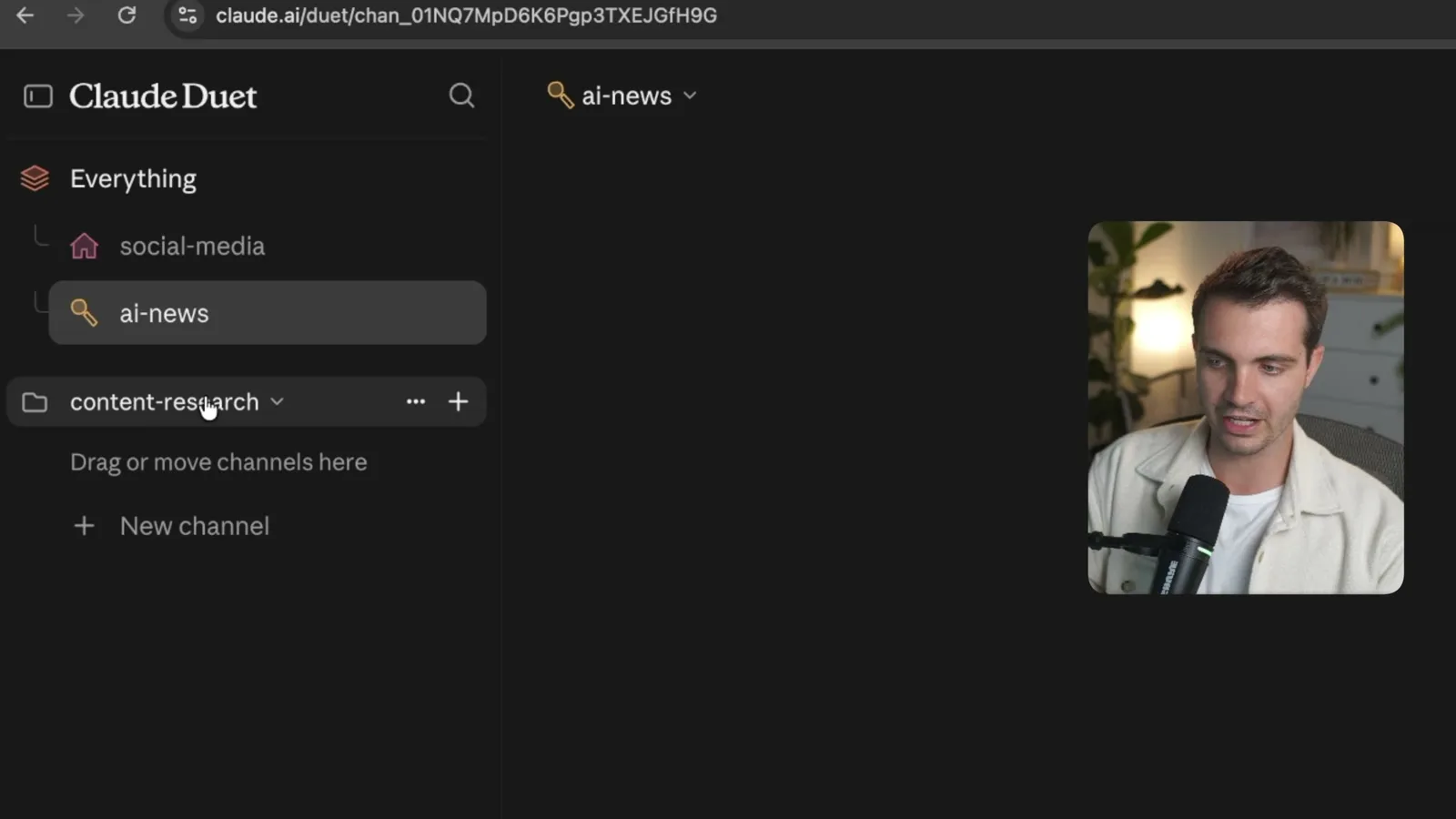
I like channels for keeping topics apart. I don't like having a second place to check, because it's the same brain in both apps. I'd rather see Duet act as a coordinator for the chats I already have.
To test the difference, I asked both the same question: what were the three biggest AI launches this week, and which one should I make a YouTube video about?
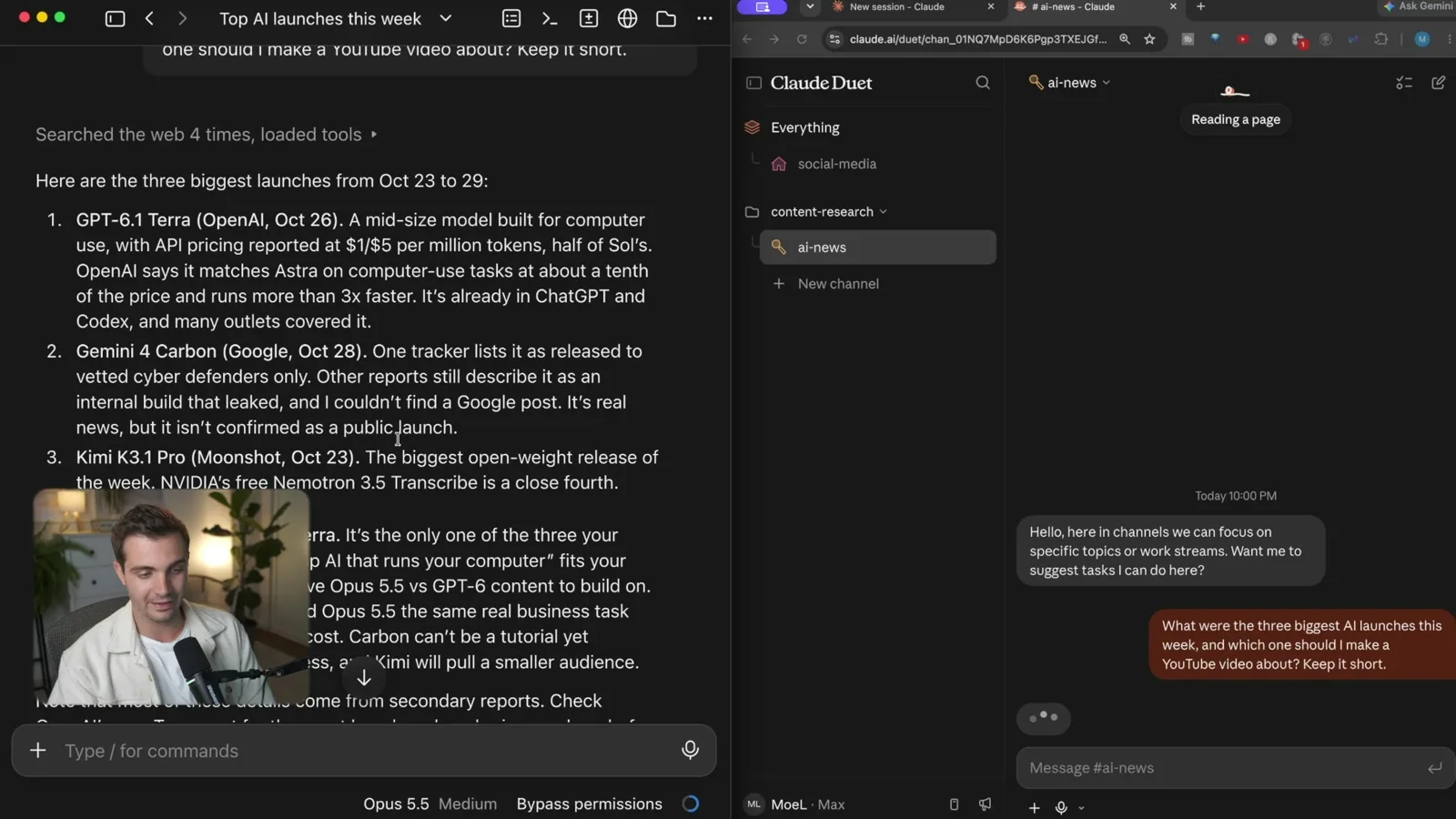
My Claude Code session answered first, and Duet took more than a minute longer. That's not a fair race, because my session runs out of my own repository and second brain, so it knows my whole context. The answers were still close. Both picked GPT-6.1 Terra and Gemini 4 Carbon, and they split on the third pick.
2. It's supposed to message you first#
This is the whole pitch, and it's where I was most let down. Claude usually waits for you. Duet is supposed to come to you.
I asked for a lot, and it sent only a few messages across two days. One of those told me it couldn't report on my YouTube watch because YouTube had blocked its view count reads. I run other agents side by side, and ChatGPT Dots and Meta Muse have been watching my inbox and suggesting things all the time.
Quiet isn't always bad. If AI agents already spam you, you may like that Duet holds back. But I think Dots and Muse have found a better balance: they offer to help more often without being obnoxious. For a proactive agent, I want it to speak up more.
3. It works with your laptop closed, but that's not new#
Duet runs on its own computer in the cloud, so it keeps going when your laptop is shut. For most people that's a real selling point.
If you already use Claude a lot, you may have this. Type /remote-control in a regular Claude Code session and you can reach that session from your phone. So I don't need Duet to keep work moving while I'm away from my desk.
I also run my own always-on agents with Hermes and OpenClaw. If that's the direction you want, I wrote up how to host Hermes Agent 24/7, and my next video compares it with Duet.
4. It uses your Claude plan, and you can't see how much#
Duet has no separate price, but the work has to come from somewhere. On the $20 plan it could take a real share of your usage. On the $200 plan you might not notice.
I asked Duet how much of my plan it had used and what that would cost in API pricing. It told me it couldn't see my plan usage or token counts. There's no per-chat breakdown either, and the /usage command you'd reach for in Claude Code doesn't work there.
My best proxy was my cloud session credits, which showed $240 of $250 left about a day after setup. So I think it used around $10, even though I didn't use it heavily. The settings page says those credits apply automatically to cloud sessions, and your regular usage takes over once they're gone.
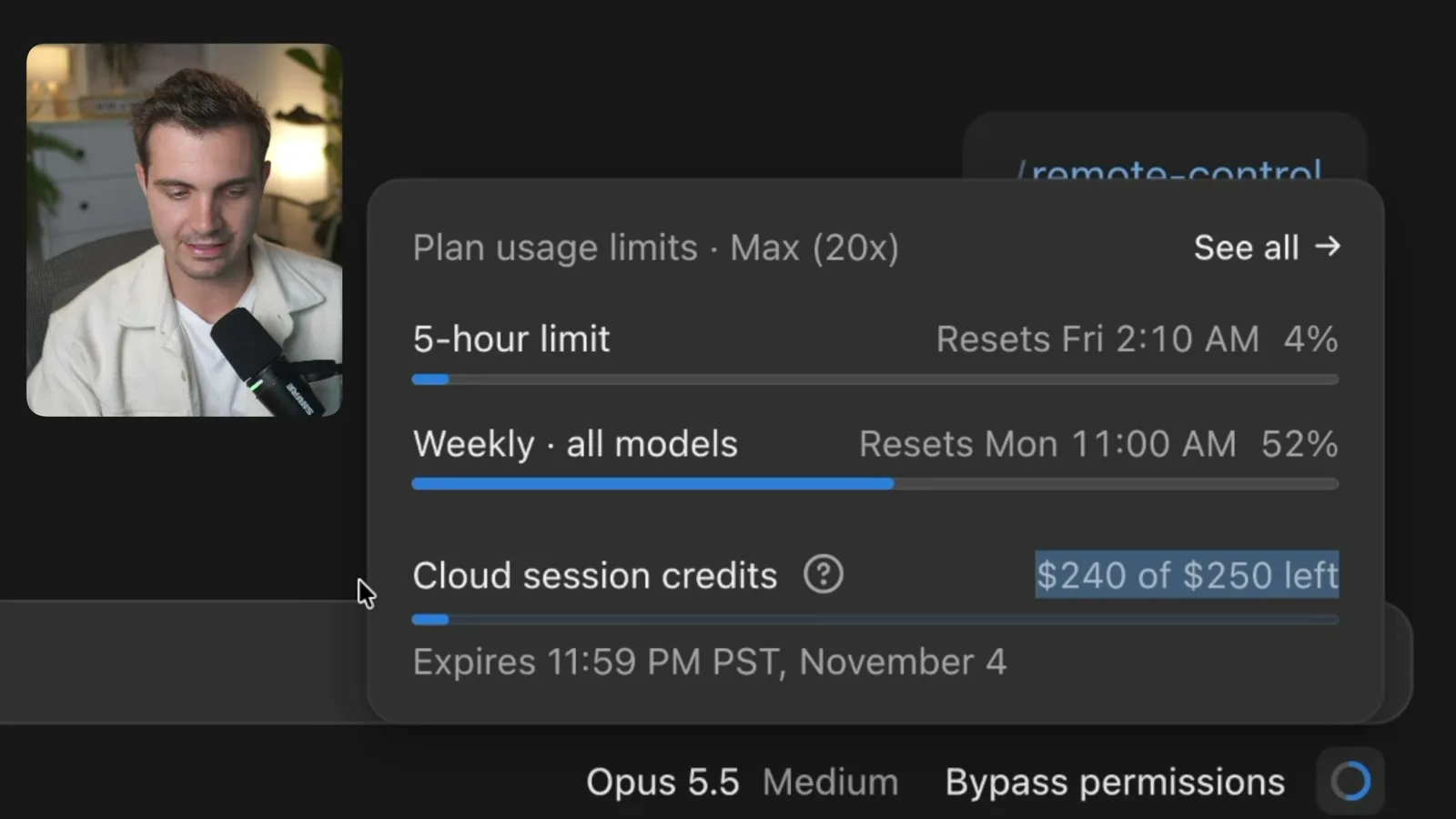
For an agent that's meant to always be on, I want a clear number for what it uses every day. If you're on a smaller plan, watch your usage page for the first few days.
5. What I really wish it was#
I use Claude every day, and it's the workhorse for my businesses and apps. So this isn't me being negative about what Anthropic is building.
But I've also built personal assistants with Hermes and OpenClaw, and I've used ChatGPT Dots, Meta Muse and Grok Bot. Compared with those, Duet feels closer to Claude Projects than to something that uses everything Claude already has.
Here's what I'd want:
- Duet built into the Claude app, on my phone and my computer
- One Claude that can steer my other sessions, both local and in the cloud
- Access to the skills and files on my computer, not just what's uploaded
- A choice of model, like Sonnet 5.5, Opus 5.5 or Haiku 5.5
- A choice of reasoning level
The skills and files point is the big one. A lot of my knowledge lives on my computer, so on my first day Duet didn't make me more productive.
Should you use Claude Duet?#
If you run your business from your phone and live in your email and calendar, join the waitlist. The setup is quick, the design is clean and channels are a smart way to keep topics apart.
If you already live in Claude on your desktop, you're not missing much yet. Keep using regular Claude. Anthropic is shipping fast, so Duet could look very different in a few weeks. Check back once it can work with your computer.
Watch the full walkthrough on YouTube: https://youtu.be/xiSwgTFiXSs
Moe shares tool walkthroughs and lessons from real projects. Mechanical engineer, then venture capital, now building AI tools for creators and small businesses. More about Moe
Get new videos in your inbox
Weekly AI workflows. No fluff.
No spam. Unsubscribe anytime.