Kling 4.0 Review: I Tested It vs Seedance 2.0 and 2.5
I tested Kling 4.0 on launch day against Seedance 2.0 and 2.5. Where it wins, where it loses, real credit prices, and how to use its keyframes and references.
 By Moe Lueker
Kling 4.0 is not the most realistic AI video model you can use today. With text alone, Seedance 2.0 beat it on my hardest prompts.
Give it references, though, and it does things nothing else on Artlist does. I put my own face into a real viral wingsuit video, made a 15-second ad in one generation and staged a fight scene with me in it, all on launch day.
So here's my honest take after testing it on October 21, 2026, the day it went live on Artlist: what's new, how it compares to Seedance 2.0 and 2.5, what it really costs per clip, and the exact steps for references and start, middle and end frames.
The short answer#
Use Kling 4.0 when you have references: a face, a product, a location, a video whose camera moves you want to copy, or frames you want the clip to hit. Use Seedance 2.0 when you only have a text prompt and you want the most realistic shot for the least money. Use Seedance 2.5 when you need its look and don't mind paying about 3.6 times as much per clip.
The catch with Kling 4.0 is that great reference prompts take work: every image needs a job and every shot needs a time. I hand that part to my Claude video director skill, which writes the storyboard, the reference images and the final Kling prompt from one line.
What's new in Kling 4.0#
Kling released 4.0 on October 15, 2026 (Kling's release notes). This is what I could actually use inside Artlist's Kling 4.0 settings on launch day:
- 3 to 30 seconds per clip, in one generation. No stitching.
- 720p or 1080p. No 4K and no HDR yet. Artlist says both are not available at launch, so ignore the sites promising "30s 4K HDR".
- Start, middle and end frames. The middle frame is the new part.
- Up to 10 reference images and up to 5 reference videos in one generation.
- 16:9, 9:16, 1:1 and 21:9, with sound on or off.
- longest clip in one generation
- 30 s
- longest clip in one generation
- keyframe types: start, middle and end
- 3
- keyframe types: start, middle and end
- reference images + reference videos
- 10 + 5
- reference images + reference videos
- credits for 10 s at 1080p (about $1.43)
- 2,750
- credits for 10 s at 1080p (about $1.43)
Kling's own pages talk about "up to 15 references" and 10 keyframes in total. The numbers above are what Artlist's interface showed me, which is what you'll actually work with.
Artlist sponsored my Kling 4.0 video and set me up with the plan, which is why I ran every test there, and I'm grateful they let me test it the day it launched. If you want to follow along, this is the link I use:
Kling 4.0 vs Seedance 2.0 vs Seedance 2.5#
Here's how the three compare inside Artlist, from the settings I checked on October 21:
| Kling 4.0 | Seedance 2.0 | Seedance 2.5 | |
|---|---|---|---|
| Clip length | 3 to 30 s | 4 to 15 s | up to 30 s |
| Resolution | 720p, 1080p | 720p, 1080p | 720p, 1080p |
| Start and end frame | Yes | Yes | Yes |
| Middle frames | Yes | No | No |
| 10 s at 1080p with sound | 2,750 credits | 2,850 credits | 10,000 credits |
| Text-only realism (my tests) | Behind Seedance 2.0 | Best of my tests | Not compared |
Two things stand out. Kling 4.0 is the only one of the three that takes a middle frame, and it runs twice as long as Seedance 2.0. It is not longer than Seedance 2.5, which also goes to 30 seconds.
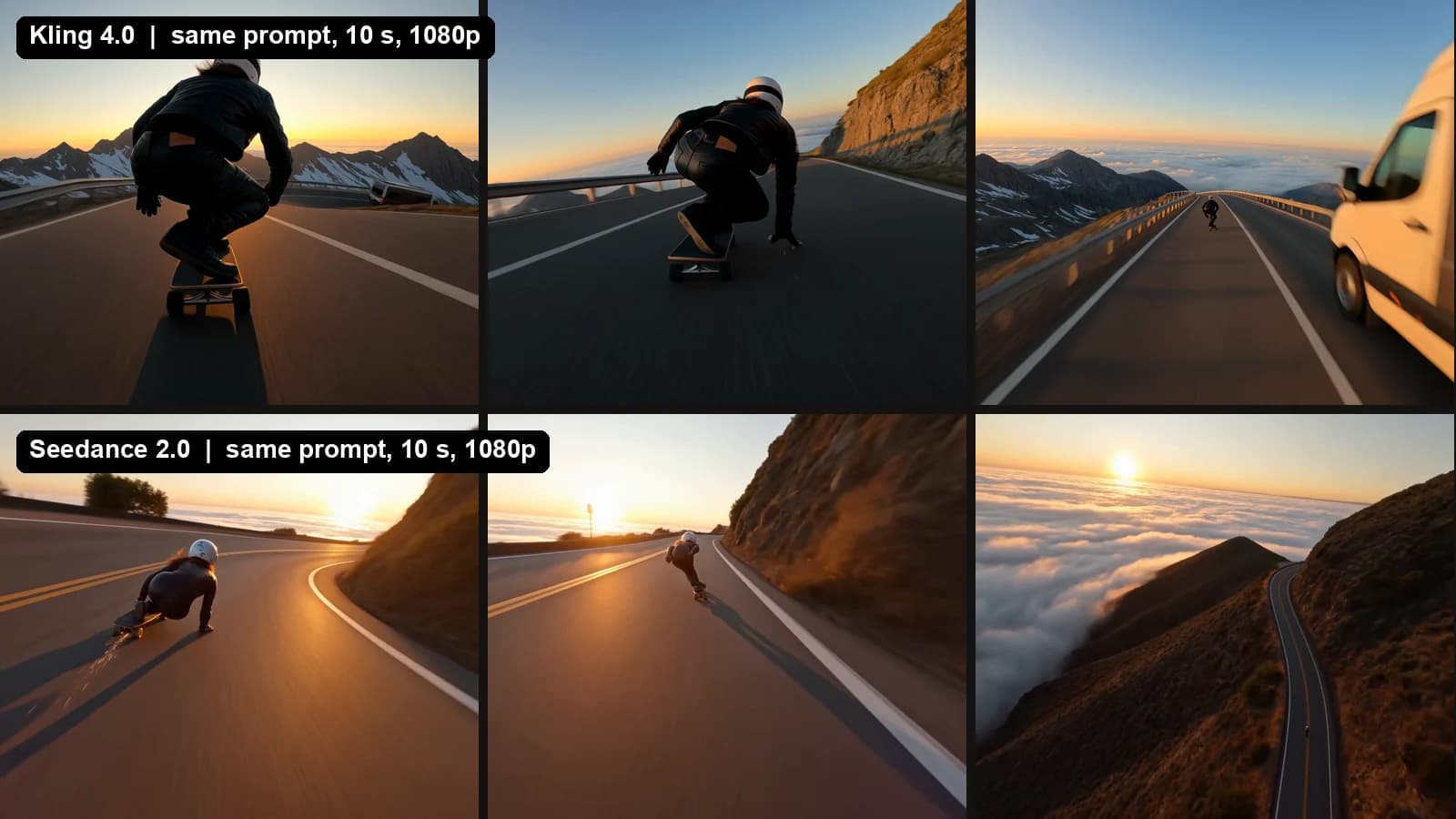
That's the same skateboarder prompt on both models, three frames from each 10-second clip. Kling 4.0 went for a chase-cam with a van passing close. Seedance 2.0 gave me a more cinematic sunset run with a drone pull-out. Both kept the board and the rider in one piece through the turns.
Where Kling 4.0 wins#
- References. This is the whole reason to use it. It held my face, the lettering on my helmet and the camera path of a real video.
- Middle frames. You can force the story through a point halfway, not just a start and an end.
- Length. 30 seconds in one take, double Seedance 2.0.
- Price at 1080p. A hair cheaper than Seedance 2.0 and about a quarter of Seedance 2.5.
Where it doesn't#
- Text-only realism. On big-wave surfing and super close-up faces, Seedance 2.0 looked more real to me with the exact same prompt. If you only type prompts, Kling 4.0 is not the upgrade.
- 720p price. At 720p, Seedance 2.0 is the cheapest option by a lot (1,150 credits vs 1,750).
- No 4K. If you need 4K masters, you still need an upscaler.
- Leaderboards haven't caught up. No public arena has a score for it yet, so you're relying on tests like mine (more on that below).
How much Kling 4.0 costs#
Artlist quotes the exact cost before you generate. I used 10 seconds with sound for every model, then turned credits into dollars at the AI Creator plan billed yearly: $41.67 a month for 80,000 credits, before tax.
Artlist's own cost-to-generate quote. Dollars at the AI Creator plan billed yearly ($41.67 a month for 80,000 credits, before tax).
Source: Artlist cost-to-generate quotes for 10 s with sound, checked Oct 21, 2026. Dollar figures are approximate, assume every plan credit is used, and leave out retries.
In short: at 1080p, Kling 4.0 (2,750 credits, about $1.43) costs about the same as Seedance 2.0 (2,850 credits) and about a quarter of Seedance 2.5 (10,000 credits, about $5.21). At 720p, Seedance 2.0 is the cheapest of the three at 1,150 credits, about $0.60.
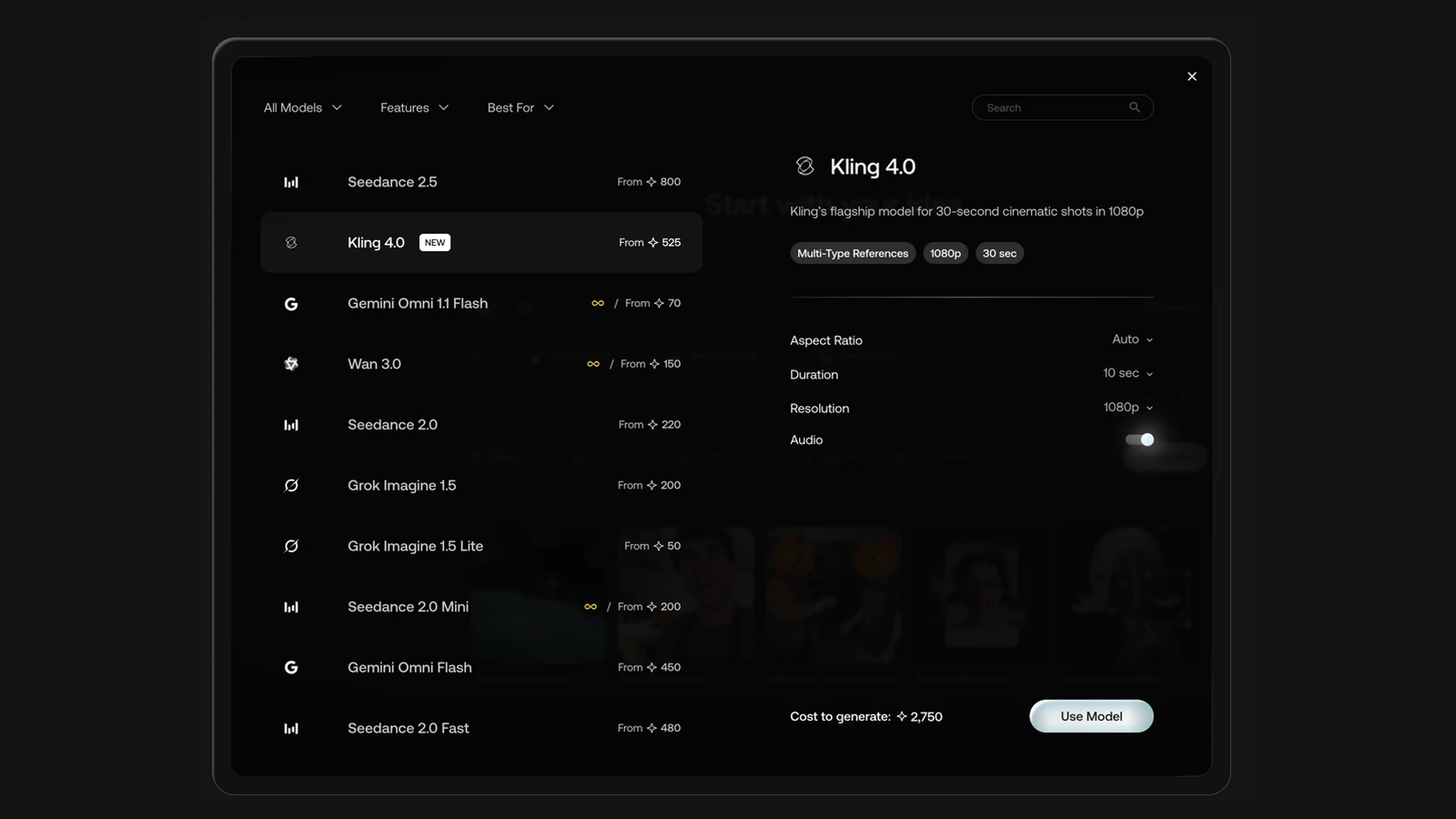
On that plan, 80,000 credits is about 29 ten-second Kling 4.0 clips at 1080p, or 45 at 720p. One catch: Kling 4.0 is not one of Artlist's unlimited models. The infinity sign in the picker only sits next to lighter models like Gemini Omni 1.1 Flash, Wan 3.0 and Seedance 2.0 Mini, so Kling always uses credits. A good habit: draft the idea on an unlimited model, then spend credits on Kling once you know the shot.
I explain how the unlimited plan works, and which models it covers, in the AI video generator with no credit limits.
How to use references in Kling 4.0#
This is how I put my face into a real wingsuit flight that went viral on Instagram (the original is by Espen Fadnes).
- Cut the reference video. I trimmed the first 10 seconds: the smoke trail coming down from the sky, the fly-by and the selfie shot. Shorter, cleaner references copy better.
- Make the replacement image. I put my face on the pilot with GPT Image 2.5 inside Artlist and added "SUBSCRIBE @MOELUEKER" to the helmet. That became Image1.
- Add a location image. A still of the mountain road became Image2.
- Give every reference one job. In the prompt, say it plainly: @Video1 is for the camera moves, timing and cuts. @Image1 is the pilot, his face, suit and helmet. @Image2 is the road and the rocks.
- Describe the shots with timecodes. I wrote what happens from 0 to 2 seconds, 2 to 2.5, and so on, matching the original cut.
- Say what to keep sharp and what to skip. "Keep the helmet lettering readable." "Do not copy any on-screen text from @Video1. No music."
- Pick the settings. 10 seconds, 9:16, 1080p, sound on. Then generate.
Here's the result, straight out of Kling 4.0:
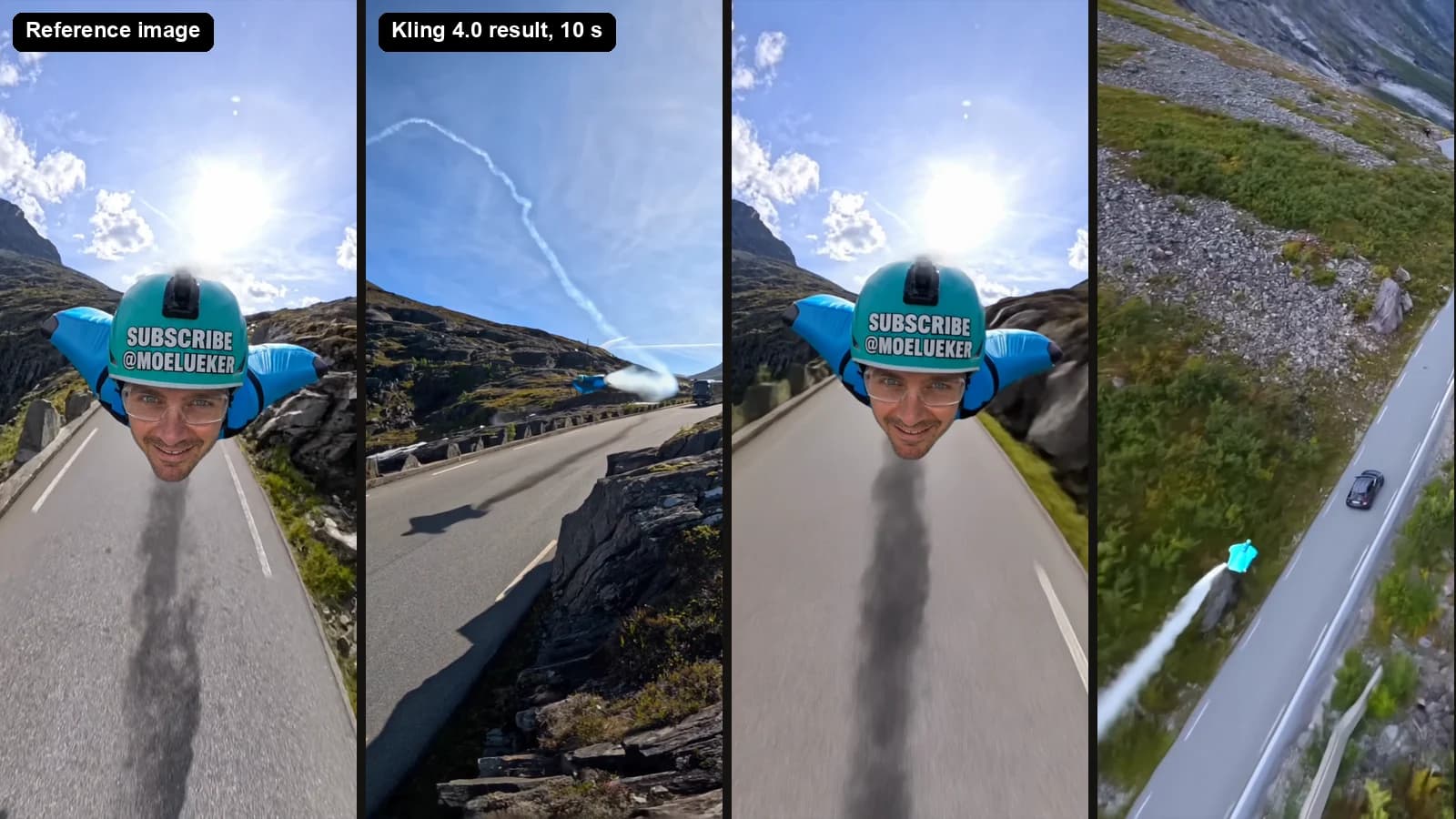
It followed the camera path closely and kept my face and the helmet text in the selfie shot. The "one job per reference" line is the part that made the difference. When you upload four files and don't say which is which, the model guesses.
How to use start, middle and end frames#
My test was a barn-find truck restoration. Three stills of the same pickup: rusty in an old barn, halfway done in gray primer in a workshop, and finished in glossy red at sunset.
- Make three frames of the same subject with the same camera angle. I made mine with GPT Image 2.5 in Artlist. Change the state, not the framing.
- Load them in order. Frame 1 into the start slot, frame 2 into a middle slot, frame 3 into the end slot.
- Describe the in-between, with times. For example: "0 to 3 s: dust drifts through the light as the rusty truck sits in the barn. 3 to 6 s: in fast time-lapse the rust sands away to gray primer. 6 to 10 s: glossy red paint sweeps across the body and the headlights flick on."
- Lock the camera in words. "Camera locked at the same three-quarter view the whole time." Otherwise the model invents a camera move to get between your frames.
- Add sound cues. A sander buzzing, a spray gun hissing, the engine starting. Kling makes the audio in the same pass.
Seedance 2.0 and 2.5 can only take the first and the last of those frames, so the middle beat is up to luck. With Kling 4.0 you choose it.
A full ad in one generation, with my Claude video director#
The most useful thing I made wasn't a stunt. It was a 15-second activewear ad, generated in one go.
I gave my Claude video director skill one short brief. It wrote the storyboard, made four reference images (the model's face, her full outfit, the bottle and the rooftop), then wrote the Kling 4.0 prompt with five timed shots and a job for each reference. Kling made the whole ad in a single generation, with the same model in every cut.
That's the real advantage of Kling 4.0 for me. References plus timed shots are a lot to write by hand, and a director that writes them for you turns it into a one-line job. I show how I built that skill, and the ads it made, in my AI video director skill for Claude Code.
Where Kling 4.0 sits on the leaderboards#
Not on them yet. I checked both public video arenas on October 21, 2026, and neither has a Kling 4.0 score. Switch between the two boards below:
Kling 3.0 1080p (Pro) is the board's fixed anchor at 1000. Lines show the 95% interval.
- #1Wan 3.01175
- #5Seedance 2.51158
- #9Seedance 2.01136
- #10Gemini Omni Flash 1.11130
- #17Kling 3.0 Omni (Pro)1020
- #18Kling 3.0 (Pro)1000
- #21Veo 3.1963
- -Kling 4.0Not rated yet
Source: Artificial Analysis, checked Oct 21, 2026. Selected rows; ranks are each model's position on the full board. The axis does not start at zero because Elo has no zero.
On Artificial Analysis, Seedance 2.5 sits 5th (1158 Elo) and Seedance 2.0 9th (1136), while Kling 3.0 is 17th and 18th, about 115 to 160 points behind Seedance. On Arena, the best Kling model is Kling 2.5 Turbo in 28th place. That gap is what Kling 4.0 has to close.
So nobody can honestly call Kling 4.0 "the best AI video model" yet. The arenas also disagree on who's on top. If you care about rankings, check back in a few weeks. If you care about control, you can judge that today.
Get the prompts, or skip writing them#
The fastest way to good Kling 4.0 clips is to stop writing reference prompts by hand. My Video Director Skill for Claude Code ($39, 30% off with code DIRECTOR30) plans the shots, makes the reference images and writes the Kling 4.0 prompt with a job for every reference. It's what made the activewear ad above.
If you'd rather write your own, every prompt from my tests, including the wingsuit reference prompt and the truck keyframes, is in my free Kling 4.0 Prompt Playbook: 17 copy-paste prompts with the settings for each.
If you're coming from Seedance, my Seedance 2.5 walkthrough has the prompt formats that carry over, and the Kling 3.0 commercial build shows how far the last version got.
FAQ#
What is Kling 4.0?#
Kling 4.0 is Kuaishou's AI video model, released on October 15, 2026. It makes clips of 3 to 30 seconds with sound in one generation, at 720p or 1080p, and takes start, middle and end frames plus up to 10 reference images and 5 reference videos on Artlist.
Is Kling 4.0 better than Seedance 2.0?#
It depends on your input. With references or keyframes, Kling 4.0 gives you more control and longer clips. With a text prompt only, Seedance 2.0 looked more realistic in my launch-day tests on big-wave surfing and close-up faces, and it's cheaper at 720p.
Is Kling 4.0 better than Seedance 2.5?#
Kling 4.0 costs about a quarter as much per 1080p clip on Artlist (2,750 vs 10,000 credits for 10 seconds with sound) and adds middle frames. Both go up to 30 seconds. Seedance 2.5 currently ranks 5th on Artificial Analysis, where Kling 4.0 has no score yet.
How much does Kling 4.0 cost?#
On Artlist, a 10-second clip with sound costs 1,750 credits at 720p and 2,750 credits at 1080p. On the AI Creator plan billed yearly ($41.67 a month for 80,000 credits), that's about $0.91 and $1.43 per clip.
Does Kling 4.0 make 4K or HDR video?#
Not at launch. Artlist offers 720p and 1080p and says 4K and HDR aren't available yet.
How long can a Kling 4.0 video be?#
Up to 30 seconds in a single generation, with a minimum of 3 seconds.
Can Kling 4.0 copy a real video?#
Yes. You can upload up to 5 reference videos on Artlist and tell Kling to follow their camera moves and timing while swapping in your own character from a reference image. Only use videos you have the rights to, and credit the original creator.
Is Kling 4.0 free?#
Not on Artlist. It always uses credits and isn't one of the unlimited models.
Some links above are affiliate links, so I may earn a commission at no extra cost to you. I only recommend tools I actually use.
Moe shares tool walkthroughs and lessons from real projects. Mechanical engineer, then venture capital, now building AI tools for creators and small businesses. More about Moe