Suno MIDI: How to Export and Import MIDI (2026 Guide)
Suno MIDI arrived with Studio 2.0. Here is how to export a .mid file from any Suno song, import your own, and move parts into Logic Pro or Ableton.
 By Moe Lueker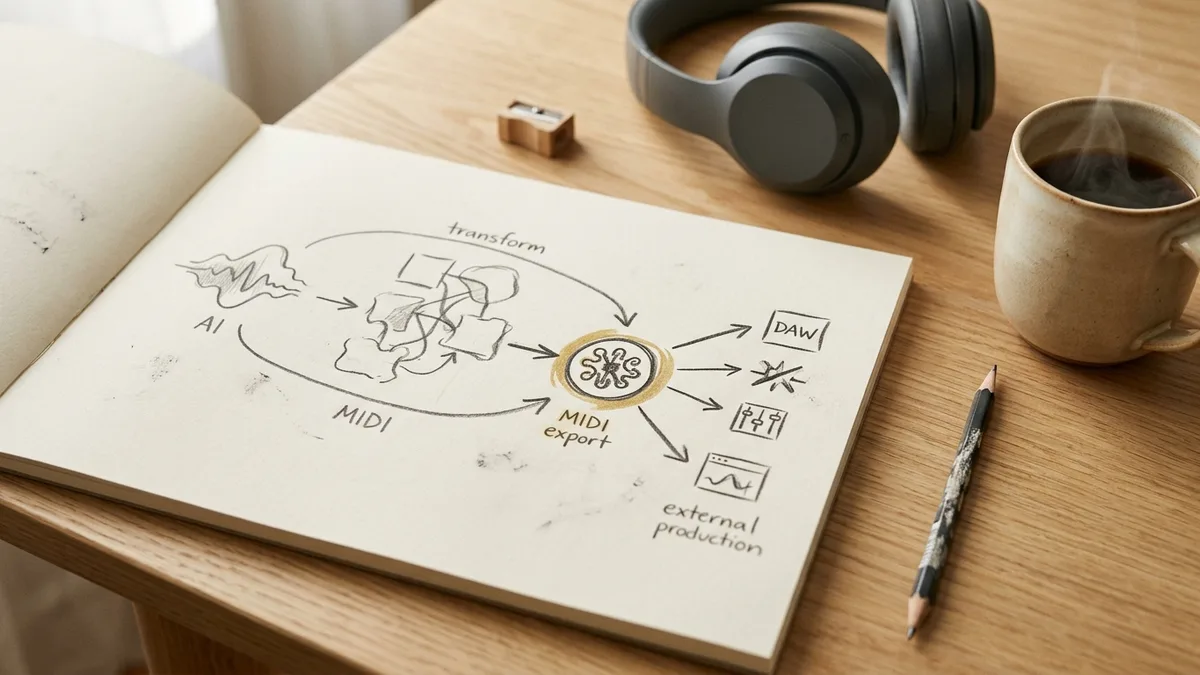
Suno MIDI did not exist until Studio 2.0 shipped. Before that, whatever Suno generated was audio and it stayed audio. You could separate stems, but you could not touch a single note.
Now you can pull a .mid file out of a generated track, edit the notes on a grid, and drag that file into Logic Pro, Ableton, or FL Studio. That is a different tool than the one people argue about on Reddit.
This is the practical version: what works, what does not, and the one step most people miss.
What Suno MIDI Actually Gives You#
Three separate capabilities landed together, and they get confused for each other.
MIDI generation. You describe a part and the AI writes the notes. Add a new track, choose MIDI instead of audio, and prompt it.
MIDI export. You take a track that already exists and convert it to notes. This is the "get MIDI" button, and it downloads a real .mid file to your machine.
MIDI input. If you have a MIDI keyboard connected, you can play a part in yourself rather than prompting for it.
The third one gets the headlines. The second one is the one that changes your workflow.
How to Export MIDI From Suno#
Select the track you want, then click get MIDI. Your browser will ask you to allow the download, and you get a .mid file.
That file behaves like any other MIDI file. Drop it into a DAW and you get the notes on a piano roll, not a rendered audio clip, so you can change the instrument, fix the timing, or rewrite the melody entirely.
Worth knowing before you rely on it: the conversion is an interpretation of the audio, not a lossless readout of some underlying score. Suno generated audio first. The MIDI is derived from it. Dense, layered parts convert less cleanly than a single clear line, so export individual stems rather than a full mix.
The Round Trip Most People Miss#
Here is the step that makes Suno MIDI genuinely useful, and almost nobody does it.
Export a track to .mid, then create a new MIDI track inside Suno and drag that same file back in.
The part that comes back is far more detailed than what the AI writes from a text prompt. Prompting gives you a reasonable sketch. The exported MIDI carries the actual phrasing and voicing from the generated performance, and now every note sits on a grid you can move.
I found this while producing a full track and it changed how I use the tool. Prompt to get something musical, export it to capture what the model actually played, reimport it to take control. The full production, start to finish, is in my Suno Studio 2.0 walkthrough.
Editing MIDI Once It Is In There#
With notes on a grid you get the usual operations.
Quantize snaps timing to a division. One warning from experience: quantizing to 1/8 made a piano part sound too perfect. The small timing inconsistencies were what made it sound played instead of programmed. Quantize when a part is genuinely sloppy, not as a reflex.
Key and scale let you shift a part to fit the rest of the song without rewriting it.
Transpose is often faster by hand than by prompt. I asked the AI to turn a piano part into a bass line and it returned a plain up-and-down pattern I did not want. Selecting the notes I liked and dropping them four octaves took seconds and sounded better.
Loop repeats a region, which matters because copying a good part across every chorus is cheaper and more coherent than regenerating it each time.
MIDI Tracks Get Real Synths#
Once a part is MIDI it is being played by a synthesizer, so you get synth controls rather than audio effects.
Each MIDI track has a wavetable you can expand, with envelope, filter, and oscillator sections. Changing the filter cutoff and switching off the second oscillator turned a piano line into a plucky bass sound without touching a single note.
A useful habit: split a busy MIDI part into two tracks, one for the high melody and one for the lower chords, then give each its own synth settings. One part, two sounds, far more space in the mix.
If you want the prompting craft that produces parts worth exporting in the first place, that is what my guide to writing hit songs with AI covers, including style prompts and when 4.5 beats 5.5.
Taking Suno MIDI Into Logic Pro or Ableton#
This is the workflow that makes Suno worth a serious producer's time.
Build the idea in Suno, where generating and rearranging is fast. Export the MIDI for the parts you want to keep and the multi-track WAV stems for everything else. Open your DAW, drag the .mid files onto instrument tracks, and assign whatever instruments you actually own.
You are no longer bound by Suno's sounds. You get the composition, and your plugin collection does the rest.
Going the other way works too. If you already have a part written, bring it in as MIDI and let Suno build a song around it instead of starting from a text prompt.
What Suno MIDI Cannot Do#
Being straight about the limits, because this is where the disappointment usually comes from.
It does not turn Suno into Ableton. There is no plugin ecosystem, no third-party instruments, and nothing like the depth of a mature DAW. The value is speed and starting points, not a replacement.
MIDI conversion quality tracks the source. Clean, isolated parts convert well. Dense mixes do not.
AI-generated MIDI needs editing. Every part I prompted was a decent draft and none were finished. Budget time for cleanup.
And it is gated. MIDI lives in Studio, and Studio requires the Premier plan at $24 a month billed annually or $30 month to month. Suno's free tier still lets you write and generate songs, but the MIDI tools are not in it.
The Fastest Way to Get Something Worth Exporting#
MIDI editing only pays off if the generated part was good to begin with, and that comes down to the prompt. The free Suno AI Lyric Generator GPT I built has been used over 50,000 times and turns a rough idea into a structured style prompt and formatted lyrics, which is what gets you a musical result on the first or second generation rather than the sixth.
Every generation now runs on Suno V6, so your settings matter as much as your prompt. My guide to Suno V6 covers which of the three models to pick and how I set Weirdness, Style Influence and Variety.
If you are doing this to sell music rather than to make it, the production side is only half of it. My Suno Master Class Bundle covers the commercial side and includes the lyric GPT and the usage guide.
Export one track to MIDI today and drag it into whatever DAW you already own. That single round trip will tell you more about whether this fits your workflow than any review will.
Some links above are affiliate links, so I may earn a commission at no extra cost to you. I only recommend tools I actually use.
Moe shares tool walkthroughs and lessons from real projects. Mechanical engineer, then venture capital, now building AI tools for creators and small businesses. More about Moe