How to Build Your Own Claude Duet With Hermes Agent (4 Prompts)
I turned Hermes Agent into my own Claude Duet with four copy-paste prompts. It runs on my ChatGPT plan, works on Telegram and can switch to Gemini 4 Neon.
 By Moe Lueker
I turned Hermes Agent into my own personal assistant by pasting in four prompts. It works a lot like Claude Duet, ChatGPT dots, Grok Bot or Meta Muse. The difference: it runs on my own server, it uses the ChatGPT plan I already pay for, and I can switch it to a different AI model whenever I feel like it.
The short answer: get the managed Hermes Agent app on Hostinger, sign in with your ChatGPT subscription, connect Telegram, then paste four prompts. One teaches it who you are, one sends you a morning brief, one sets how it does research, and one makes it ask before it does anything risky. The whole setup takes about ten minutes, and you don't write any code.
Why I built my own instead of using Claude Duet#
I've tried pretty much all of them: Claude Duet, Meta Muse, ChatGPT dots, Grok Bot and a few others. They're good. But none of them felt built around me, and some of the things I wanted just weren't possible.
The big one was the model. I wanted to use a GPT model inside Claude Duet, or Claude inside Meta Muse. You can't. Duet only runs on Claude, Muse runs on Meta's own models, and most of these assistants need that company's paid plan.
| Claude Duet, ChatGPT dots, Grok Bot, Meta Muse | My Hermes assistant | |
|---|---|---|
| Setup | None, just sign in | About 10 minutes, no code |
| AI model | Only that company's models | Any model you connect, switch any time |
| Plan | That company's paid plan | Your ChatGPT plan, or pay-as-you-go API keys |
| Phone | Their app | Telegram |
| Email and calendar | Built in | Only what you choose to connect |
| Features | What the company ships | Whatever you write in a prompt |
So here's my honest take before you start. If you want the easiest option and you don't want any setup, stick with Claude Duet, ChatGPT dots or Meta Muse. I wrote up how to use Claude Duet after testing it on real work. If you want an assistant that's built around you and isn't tied to one company, keep reading.
What you need#
- The Hermes Agent app on Hostinger. Hostinger runs the server for you, so there's nothing to install.
- An AI model. The easiest is your ChatGPT Plus or Pro plan. You can also use Hostinger's AI Router or your own API key from OpenAI, Anthropic or Google.
- Telegram on your phone (optional), so you can message your assistant from anywhere.
- About ten minutes.
Step 1: Get Hermes Agent on Hostinger#
Hostinger sponsored this video. I only agreed because I've used them for over a year. Right now I run a DeepSeek agent, a Hermes agent and OpenClaw on Hostinger servers, plus a bunch of my websites.
Pick a plan that fits how much you'll use your assistant. When I filmed during their Black Friday sale, APP 1 was $4.99 a month on the 24-month term, with 1 CPU, 4 GB of RAM and 40 GB of disk. That's plenty if you won't use it much. I went with APP 2 ($6.99 a month on the same term) because I use mine a lot.
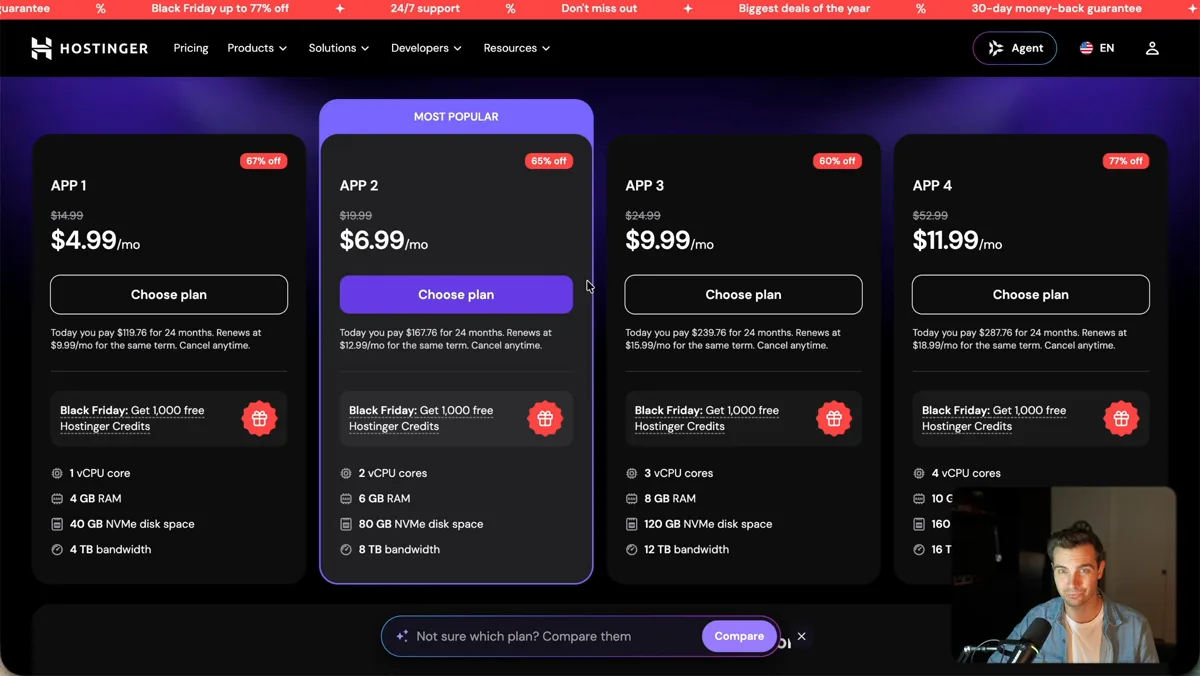
A few things that save you money at checkout:
- Monthly billing costs more. The 12-month and 24-month terms are much cheaper per month.
- Code MOE-LUEKER gives you an extra 10% off.
- Leave the AI credit add-ons unchecked if you'll use your ChatGPT plan or your own API key.
- Check the renewal price in your cart. It's higher than the first term.
Step 2: Install Hermes and connect your ChatGPT plan#
After checkout, click Setup and pick Hermes Agent Web UI. Then it asks which AI model to run.
You have three choices:
- Hostinger AI Router. The easiest, but you pay with credits.
- Your own API key from OpenAI, Anthropic or Google Gemini. You pay per use.
- Your ChatGPT subscription. My favorite. Hermes uses your plan's usage limits instead of charging you for each API call.
For option 3, click Use your ChatGPT subscription, then Continue. Copy the code it shows you, open the sign-in page, log in to your ChatGPT account and paste the code. Mine said it was signed in with Codex and connected.
One catch: it shares your ChatGPT plan's limits with everything else you do in ChatGPT and Codex. I go deeper on that trade-off in running Hermes on a ChatGPT plan with no API bill.
Step 3: Connect Telegram so you can text it#
This part takes about a minute and lets you talk to your assistant from your phone.
- In Telegram, search for BotFather and open the chat.
- Create a new bot, give it a name (mine is Hermes Agent Bot) and copy the bot token.
- Paste the token into the Hostinger setup.
- Search for userinfobot, copy your user ID and paste it in too.
- Open the bot you just made and start a conversation.
Keep your bot token and user ID private. If the token ever leaks, BotFather can revoke it.
Step 4: Say hi and pick your model#
After about a minute the setup finished. Click Copy password, then Open app, and paste the password in. That's it, you have your own agent.
Test it with something simple like "Hey, how are you doing today?" If it answers, it's connected.
Click the model button under the chat box to pick a model. With only OpenAI connected, you'll see the ChatGPT models. GPT-6.2 Astra is the strongest one right now, and GPT-6.2 Sol is the efficient one. My tip: set up two or three profiles, one for everyday tasks and one with the best model you have, like GPT-6.2 Astra, Claude Opus 5.5 or Gemini 4 Neon.
Here's a quick tour of what's in the Hermes dashboard:
- Chat: your main window, with all your conversations.
- Scheduled jobs and tasks: anything that runs on a timer shows up here.
- Kanban board: everything your agent is working on, in columns.
- Skills: turn skills on or off, or create new ones.
- Memory: what it knows about you.
- Files, profiles, to-dos and insights: your workspace, model setups and usage.
- Logs: handy when something breaks.
The 4 prompts that turn Hermes into your assistant#
This is the fun part. Every feature is just a prompt you paste in. Replace anything in square brackets with your own details. All of these are in my free prompt pack, along with 24 more.
I dictated my own versions with Rambleproof, the dictation app I built, because long prompts are much faster to say than to type.
Prompt 1: Teach it who you are#
I want you to be my personal assistant. Interview me so you can help me well. Ask me one question at a time, no more than 8 in total: what I do, my main goals right now, my typical week, the tools I use, the topics I care about, what I want you to handle, and how I like to get updates. When we're done, save a short profile of me to your memory, under 1,000 characters, and show me exactly what you saved.
In my version I added a bit about me: I make videos, my background is in tech, venture capital, startups and engineering, and I build apps for entrepreneurs. It asked follow-up questions, and I told it to be an always-on assistant that's proactive, to tell me about AI launches I should know about, and to update me at least once a day, sooner if something big drops.
Then it saved a short note about me to memory. You never have to touch memory yourself, but if you're curious, click Memory and look under User profile.
Prompt 2: A morning brief every day#
Yes, everyone jokes that the morning brief is the most generic AI agent use case. It's still useful.
Create a skill called morning-brief. Each time it runs, send me: 1) the top 3 news stories about [YOUR TOPICS] from the last 24 hours, with links, 2) one thing I should focus on today based on my goals, which are [YOUR 1 TO 2 GOALS], 3) anything I've asked you to remind me about. Keep it under 150 words. Then schedule a job that runs this skill every weekday at 7:00 AM [America/Los_Angeles] time and sends it to this chat.
It built the skill and scheduled it for 7:00 AM Los Angeles time, Monday through Friday, with AI news, today's focus and reminders.
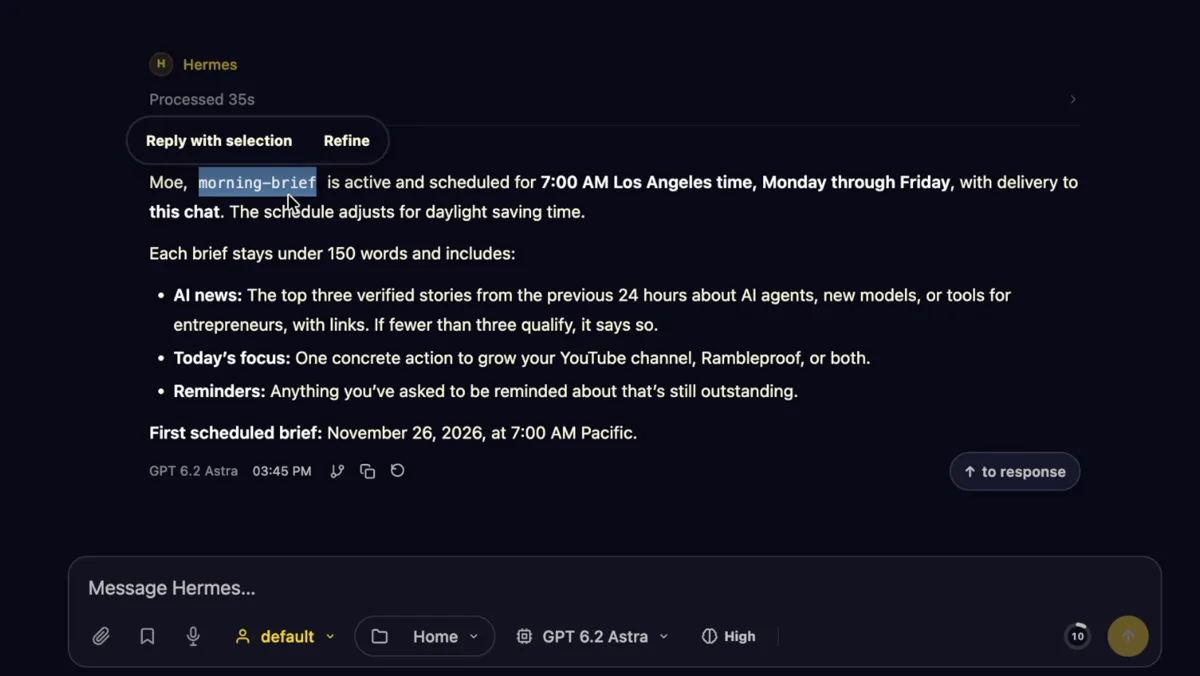
You don't have to wait until tomorrow to see it. I asked it to send me a sample brief right away, and it did.
Prompt 3: Tell it how to do research#
Research [TOPIC OR QUESTION]. Search the web, read at least 5 good sources, and give me a 5-bullet summary with links, what most sources agree on, and anything that's still uncertain. Then tell me the one thing you'd do next if you were me.
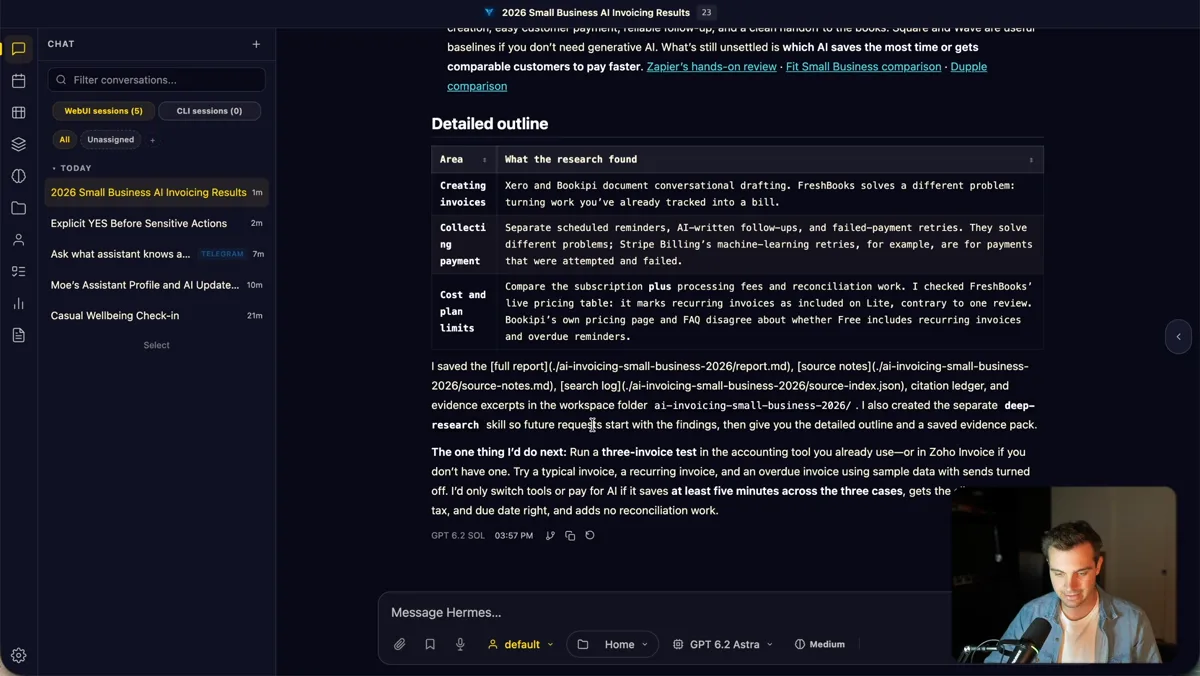
I asked it to research the best AI tools for small business invoicing in 2026. Then I added a follow-up: whenever I ask for deep research, go much deeper, save everything in its own subfolder, give me the summary first and the detailed outline second, and save all of that as a new deep research skill.
It thought for about five minutes. Then it gave me a clean report with a detailed outline, saved it in a new workspace folder and created the deep research skill, so it does it the same way next time.
While that ran, I grabbed my phone and asked my bot on Telegram, "What do you know about me?" It answered with everything from my profile. Every skill you build works there too, and you can even create new skills from your phone.
Prompt 4: Make it ask before it acts#
The more you let your assistant do, the more you want it to check with you first. This one is a must.
Save this rule to memory and never break it: before you send an email or message as me, buy anything, post anything, delete anything or share my information, show me exactly what you're about to do and wait for me to reply YES. Drafting and researching are fine without asking.
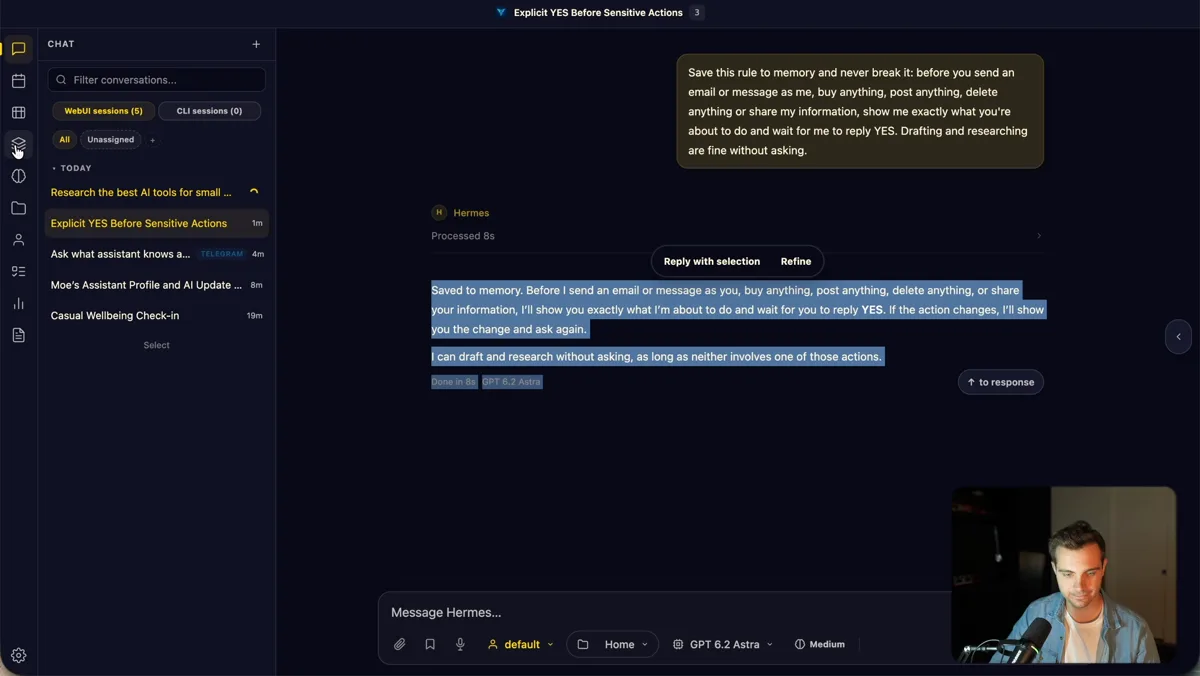
One honest warning: this is a rule your assistant follows, not a lock. The real protection is only connecting accounts you're happy for it to use. Update the rule each time you give it access to something new.
If you got this far, congrats. You have the foundation of your own personal AI assistant.
Bonus: switch to Gemini 4 Neon (or any other model)#
This is the trick that makes your own assistant more powerful than the big ones. Gemini 4 Neon just launched, and it's strong and cheap for what it does. Most personal assistants can't use it, because they're built on one company's models. Mine can. I tested Neon against Opus 5.5 and GPT-6.2 by having each one build a game in my AI escape room test.
Here's how to add it:
- In Hostinger, go to your AI agents and click Manage on your agent.
- Open AI providers, click Manage and pick the Gemini tab.
- Get a key from Google AI Studio: open the dashboard and create a new API key.
- Paste the key in and click Save and update.
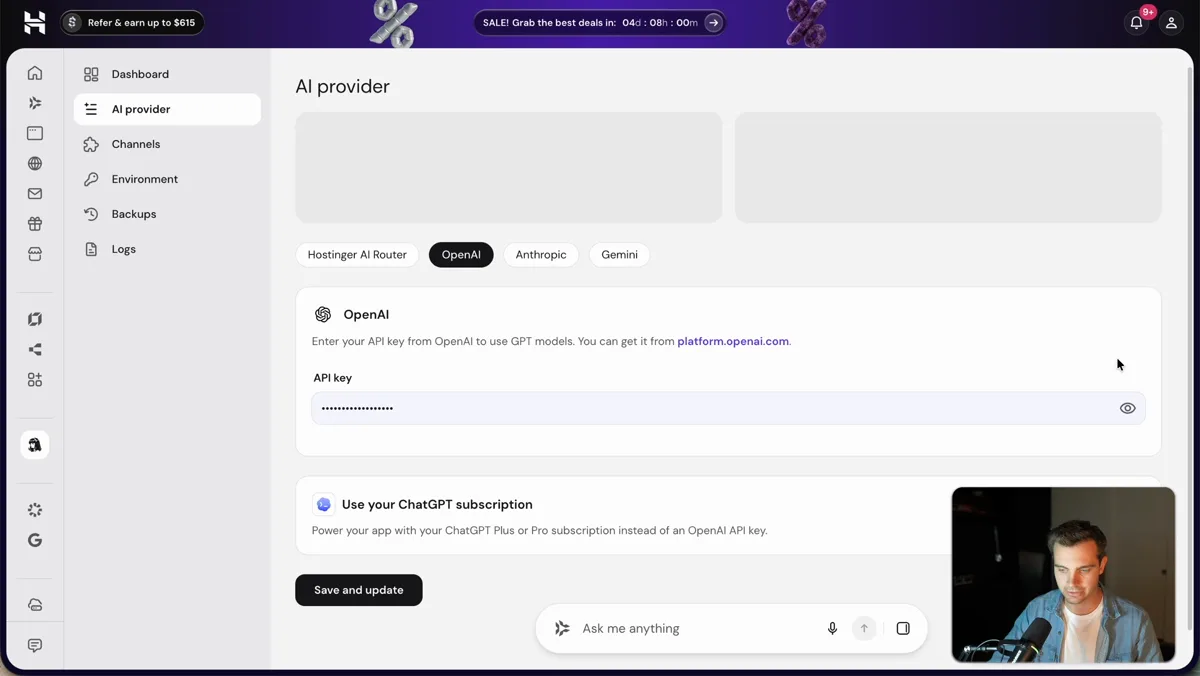
Go back to Hermes, refresh the page and start a new chat. All the Gemini models are now in the model picker.
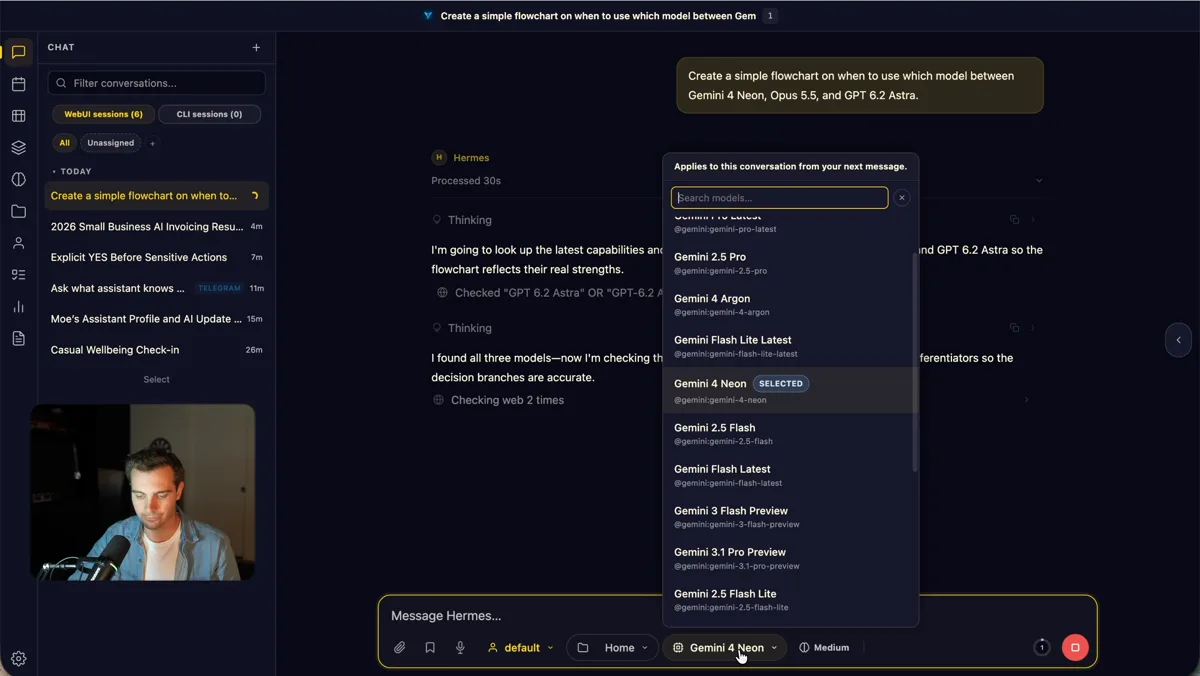
I picked Gemini 4 Neon and asked it for a simple flowchart on when to use Gemini 4 Neon, Opus 5.5 or GPT-6.2 Astra. It did its own research and came back with a breakdown of what each one is best at, its API price and what to watch out for. Same assistant, same prompts, different brain.
You're not stuck with Neon either. Gemini 4 Argon and Carbon give you more power, and Gemini 4 Hydrogen is fast and cheap.
What it costs#
| Cost | What you pay |
|---|---|
| Hostinger Hermes app | From $4.99 a month on the 24-month term when I filmed (Black Friday), plus a higher renewal price |
| AI model on your ChatGPT plan | No new bill, but it shares your plan's limits |
| AI model with an API key | Pay for what you use |
Be careful with API keys. You never really know how many tokens a task will take, and daily briefs and scheduled checks add up over a month. That's why I'd stick with the ChatGPT plan for most of your work. Its models are fast and strong, and they get you really far.
20 more things your assistant can do#
I promised more use cases. Here are a few I like:
- Meeting prep: research a company or person and send you a one-page brief 30 minutes before you meet.
- Weekly scoreboard: every Monday, what changed with your competitors and one thing to do about it.
- Deal hunting: find a cheaper phone, internet or software plan, with the catch for each.
- Email replies and inbox sorting, once you're ready to connect email.
- Plan your week.
- Analyze a spreadsheet you send it.
- Make a slide deck.
Here's the meeting prep prompt so you can try one right now:
I'm meeting [COMPANY OR PERSON] at [TIME] today. Research them and send me a one-page brief 30 minutes before: what they do, recent news, and 3 smart questions I could ask.
All 20, with copy-paste prompts, are in the free prompt pack.
What I measured#
- Setup time (Nov 25, 2026): the Hermes install finished in about a minute after I clicked through the setup.
- Research run (Nov 25, 2026): the deep research task thought for about five minutes before it delivered the report.
- Morning brief (Nov 25, 2026): scheduled for 7:00 AM Los Angeles time on weekdays, capped at 150 words.
- Price on screen (Nov 25, 2026): APP 1 at $4.99 a month and APP 2 at $6.99 a month on the 24-month Black Friday term, before code MOE-LUEKER.
- AI bill: $0 extra, because the main demo ran on my existing ChatGPT plan.
Should you build your own or use Claude Duet?#
Use Claude Duet, ChatGPT dots or Meta Muse if you want zero setup and you live in your email and calendar. They're the easiest option, and that's a real advantage. My Claude Duet guide covers access, price and how it compares to the others.
Build your own with Hermes if you want to pick the model, switch whenever a better one launches, use the ChatGPT plan you already pay for and shape every feature yourself. Once the basics work, you can grow it into a whole team of agents. I show how I set mine up in my Hermes Workspace agent team guide.
FAQ#
Can I build my own Claude Duet?
Yes. I turned Hermes Agent, an open-source AI agent built by Nous Research, into a personal assistant that works a lot like Claude Duet, ChatGPT dots, Grok Bot or Meta Muse. It runs on a managed Hostinger app, I talk to it in the browser or on Telegram, and every feature is one copy-paste prompt. No code needed.
Can Hermes Agent run on my ChatGPT subscription?
Yes. Hostinger's AI provider screen has a Use your ChatGPT subscription option for ChatGPT Plus or Pro. You sign in with a code, and Hermes then uses your plan's usage limits instead of charging you per API call. It shares those limits with the rest of your ChatGPT use.
How much does it cost to run your own AI assistant on Hermes?
Two bills. The server: when I filmed during Black Friday, Hostinger's APP 1 plan was $4.99 a month and APP 2 was $6.99 a month on the 24-month term, with a higher renewal price, and code MOE-LUEKER takes off an extra 10%. The AI model: nothing extra if you use your ChatGPT plan, or pay per use if you add an API key from OpenAI, Anthropic or Google.
Can I use Gemini 4 Neon or Claude in Hermes Agent?
Yes. In Hostinger, open your agent, click Manage, go to AI providers and paste an API key for Gemini, Anthropic or OpenAI, then Save and update. After a refresh the new models show up in the Hermes model picker. I added a Gemini key from Google AI Studio and ran Gemini 4 Neon in the same assistant.
Is Hermes Agent better than Claude Duet?
It depends on what you want. Claude Duet, ChatGPT dots and Meta Muse are easier, need no setup and plug straight into your email and calendar, but each runs on its own company's models and plan. Hermes takes about ten minutes to set up and only knows what you give it, but you pick the model, switch any time and shape every feature with a prompt.
Can I message my Hermes assistant from my phone?
Yes. Connect Telegram during setup: create a bot with BotFather, paste its token, then get your user ID from userinfobot and paste that in too. You can then chat with the same assistant, and use the same skills and memory, from the Telegram app.
How do I stop my AI assistant from doing something risky?
Save an approval rule to its memory: before it sends a message, buys, posts, deletes or shares your information, it has to show you exactly what it will do and wait for you to reply YES. It's a rule the assistant follows, not a hard lock, so the real protection is only connecting accounts you are happy for it to use.
Get every prompt from the video#
I put every prompt from this video into a free guide: the setup steps, the four core prompts, quiet hours, handy Telegram commands and 20 use cases. Pay what you want, $0 is fine.

Want to go further? The Ultimate Hermes Agent Playbook has 30 ready-to-run workflows, prompts and a full setup guide.
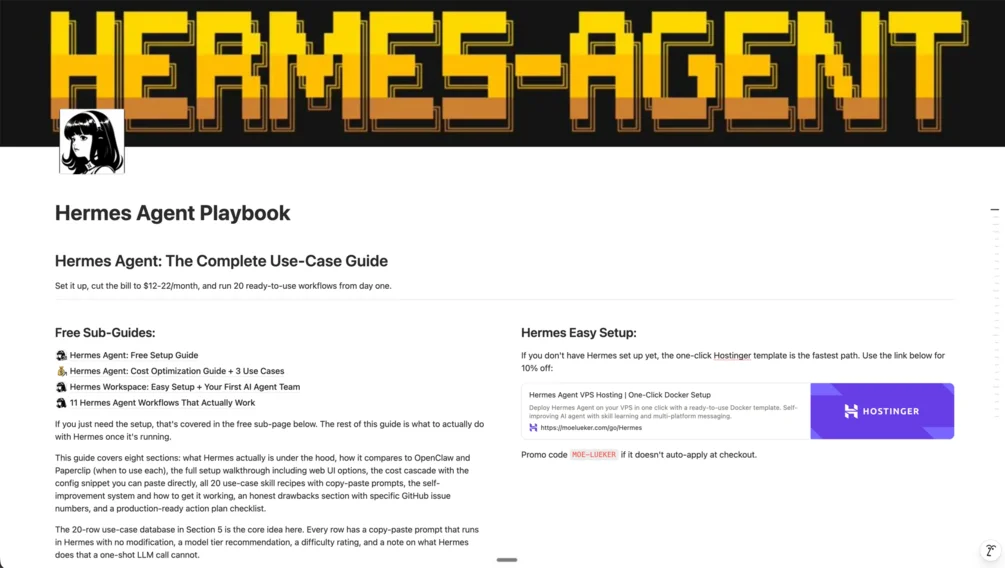
Watch the full walkthrough on YouTube: https://youtu.be/RH3e37dhC1s
Hostinger sponsored this video, and some links above are affiliate links, so I may earn a commission at no extra cost to you. I only recommend tools I actually use.
Moe shares tool walkthroughs and lessons from real projects. Mechanical engineer, then venture capital, now building AI tools for creators and small businesses. More about Moe
Get new videos in your inbox
Weekly AI workflows. No fluff.
No spam. Unsubscribe anytime.